Editor's note: This comparison was originally published in 2023. The video featured in this article is from 2023. The article has been updated in 2026 with the latest Rhino 8 changes for Mac and Windows.
Rhino is one of the most popular 3D modeling tools used by architects and designers. It offers powerful NURBS modeling capabilities along with integrated plugins like Grasshopper for parametric modeling.
Rhino is available for both Mac and Windows platforms, which often leaves users wondering - should I use Rhino Mac or Rhino Windows? What are the key differences and which one is better suited for architecture and design workflows?
In this detailed comparison, we will look at the pros and cons of Rhino Mac vs Rhino Windows to help you decide which version works best for your needs as an architect or designer.
Rhino Mac vs Rhino Windows: Interface and Design
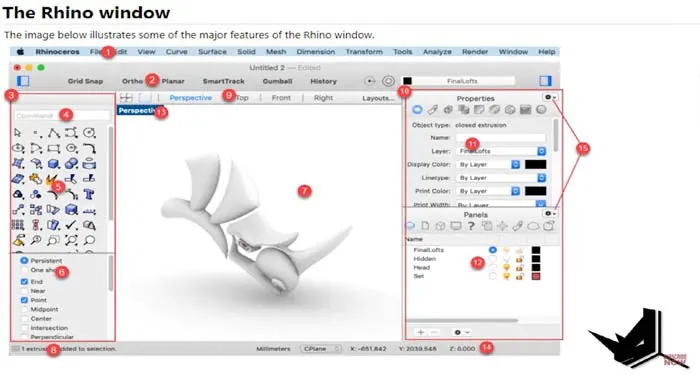
The most visible difference between the two versions is the user interface. Rhino Mac has been designed specifically for Mac with controls and icons that follow Apple's design language. This results in a sleeker and more modern looking interface.
Rhino Windows on the other hand uses an interface that hasn't changed much over the years. The icons and overall look is quite dated when compared to contemporary Windows applications.
So if visual design is important to you, Rhino Mac certainly has an edge over the Windows version.
Performance and Hardware Considerations
Both Rhino Mac and Rhino Windows are priced the same at $995. However, when it comes to performance - the hardware you use makes a big difference.
Apple computers like iMac and MacBook Pro tend to cost a lot more compared to Windows PCs with equivalent hardware. You can easily get a Windows laptop with far better CPU, GPU, RAM, and storage compared to a Mac device at the same price point.
This means Rhino Windows has the potential to deliver much better performance especially when working with complex 3D models and renderings.
So if you're looking for the best performance/price ratio, Windows is the clear winner here.
Software and Plugin Compatibility
This is where the differences between the two versions become much more apparent.Several major features and plugins work only with Rhino Windows or have limited support on Mac.
For example:
- Rhino Render - one of the most popular rendering plugins works only on Windows.
- Bongo - video animation plugin is Windows only.
- VisualARQ - Architectural BIM plugin for Rhino is also Windows exclusive.
- Rhino Inside for Revit - doesn't work on the Mac.
- Popular visualization tools like Lumion and Enscape have no support for Rhino Mac.
On the other hand, Rhino Mac excels at collaboration with other Mac software like the iOS app for viewing Rhino models on mobile.
But when it comes to third-party integrations, Rhino Windows has a clear advantage over the Mac version today. This gap in plugin support can severely limit your workflow if you rely on any of these tools.
Rhino 8 Update: What Changed for Mac Users
Since the original comparison above was written in 2023, McNeel released Rhino 8 with major improvements for Mac users. Here is what changed:
Native Apple Silicon Support: Rhino 8 is now a universal app that runs natively on Apple Silicon chips (M1, M2, M3, M4) without Rosetta translation. This alone is a massive performance boost for Mac users compared to Rhino 7.
Metal Display Pipeline: The viewport now uses Apple's Metal graphics framework for hardware-accelerated display. McNeel reports speed improvements of up to 24x in viewport navigation, meaning you can pan, zoom, and orbit complex models without dropping frames.
GPU-Accelerated Rendering: The Cycles render engine in Rhino 8 is built on Metal, so Raytraced display mode and Rhino Render are now significantly faster on Mac. This was a major bottleneck in Rhino 7 where Mac rendering relied on the CPU.
UI Closer to Windows: The Mac interface has been brought closer to its Windows counterpart with a completely rewritten Layer Manager, customizable window layouts, dark mode support, and E57 point cloud import.
Plugin Gap Still Exists: Despite these improvements, the plugin situation has not changed much. VisualARQ, Bongo, Rhino Inside Revit, Lumion, and Enscape remain Windows-only. If your workflow depends on any of these tools, Windows is still the only option.
In short, Rhino 8 has narrowed the performance gap between Mac and Windows significantly. Mac is no longer at a clear hardware disadvantage thanks to Apple Silicon. However, the plugin ecosystem remains heavily weighted toward Windows.
Verdict: Rhino for Windows is Better for Architects Overall
To summarize, Rhino for Windows easily beats the Mac version when we look at the overall value proposition:
- More affordable hardware options compared to expensive Macs
- Significantly better performance
- Much wider plugin and software compatibility
The only real advantage for Rhino Mac is its modern UI design. But if you rely on a smooth architecture workflow, Rhino Windows is definitely the winner here.
Of course, the final decision also depends on what other software you need to use. For example, if you rely on Sketchup or Vectorworks then sticking with a Mac might make sense.
But for most architects and especially those using Grasshopper, Blender or other Rhino plugins - Rhino for Windows is simply the better choice in 2023. With Rhino 8, Mac has become a much stronger option than before, but the plugin gap means Windows remains the safer bet for most professional architecture workflows in 2026.
Related Resources
If you found this Mac vs Windows comparison helpful, check out these guides:
- Architects' Tools: The 33 most important tools every architect needs to know
- CadMapper to Rhino: Import 3D city maps and terrain into Rhino step by step
- Best Architecture Schools: Find the right school for your architectural education
- Parametric Design: A comprehensive guide to parametric design principles in architecture

Rhino for Architects Course
Give your architectural skillset a major boost with the Rhino for Architects Course. Get over 60 hours of focused training tailored specifically for architects. Master commands and techniques to model, render, and animate architectural visualizations at the highest level. Click below for more information and watch your designs come alive!