
Grasshopper3D is an incredibly powerful parametric modeling tool for Rhino. With Grasshopper, you can create complex geometry and designs using code rather than manual modeling. One of the most useful components is Multipipe for Grasshopper3D - a game changer for generating smooth, SubD surfaces.
What is MultiPipe for Grasshopper3D and Why is it So Useful?
Multipipe is a component found in the Surface tab of Grasshopper. It was introduced in Rhino 7.2 and allows you to convert curves into single SubD objects.
The key benefit of Multipipe is that it creates very smooth connections between curves, making it perfect for generating organic shapes and surfaces. This is much better than trying to join curves manually, which often results in uneven transitions.
Multipipe is useful in many scenarios, but it really excels when you need:
- Smooth connections between curves for organic shapes
- The ability to precisely control curve radii
- Rectangular pipes and sharp corners from cubical forms
- Different radii pipes in a single model
Overall, Multipipe for Grasshopper3D solves the challenge of transitioning between curves cleanly. This makes it invaluable for complex surface generation.
How to Use Multipipe
Using Multipipe is straightforward. Here is a quick overview of how to use it:
- Create curves for your base geometry
- Plug these curves into the "Curves" input of Multipipe
- Connect a numeric slider to the "Node Size" input to control curve radii
- Review the smooth SubD object output by Multipipe
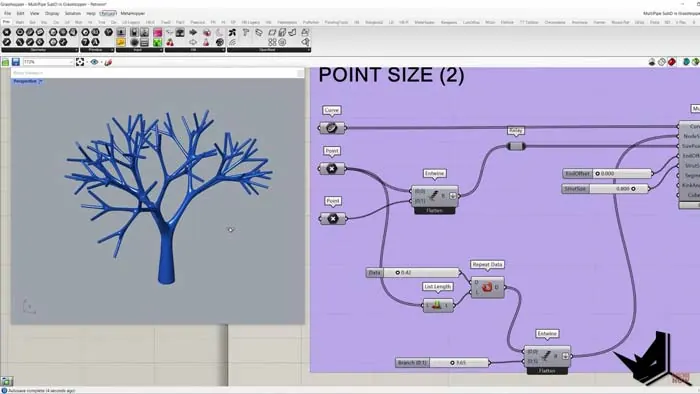
You can also use additional inputs to fine-tune the surface:
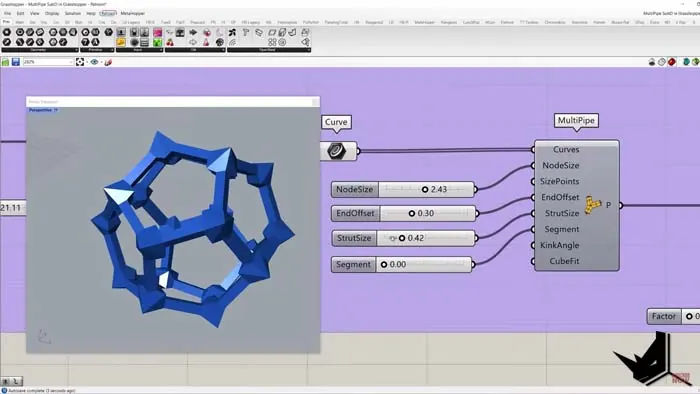
- End Offset: Offsets the end of the curves perpendicular to their directions
- Str Sides: Controls the radius of mid-curve segments
- Segments: Adds divisions along mid-curve segments
- Kink Angle: Controls precision of the SubD based on curve curvature
- Cube Fit: Sharpens corners for cubical forms
The Size Points input is useful for creating pipes with different radii in a single model. You simply provide corresponding size values for key points, and Multipipe will automatically assign the right radii to matching curve positions.
Optimizing Organic Shapes with Multipipe for Grasshopper3D
Let's look at an example of using Multipipe to create an organic surface.We'll start with a base sphere and populate it randomly with points. Then we'll connect these points to the center with curves. This gives us a series of curves radiating from the center.
Now we can plug these curves into Multipipe to convert them into a single, smooth SubD object. By controlling the Node Size, we can smoothly change the radii of the entire structure. Using End Offset and Str Sides, we can introduce organic variations across the structure.
This allows us to efficiently model complex organic shapes by leveraging Multipipe's strengths. The smooth connectivity takes the manual work out of transitions.
Sharp Cubical Forms with Cube Fit
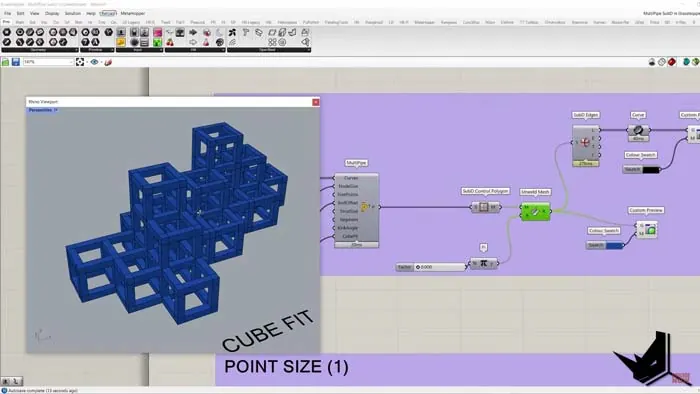
On the opposite end, Multipipe also handles sharp cubical forms thanks to the Cube Fit input.
For example, if you connect perpendicular lines to represent a cube, Multipipe will automatically smooth the corners by default.
But set Cube Fit to 1, and the corners stay perfectly sharp. This retains cubical shapes where needed while still converting disparate lines into a unified SubD.
Why is Multipipe for Grasshopper3D a Game Changer?
In summary, Multipipe brings several game-changing capabilities to Grasshopper:
- Smooth conversions between curves
- Intuitive organic surface generation
- Precise control over curve radii
- Ability to mix curve radii in a single model
- Retention of sharp corners for cubical forms
These features solve key challenges when trying to model complex geometries. As a result, Multipipe is an indispensable tool for parametric modeling in Grasshopper.
If you haven't already explored Multipipe for Grasshopper3D, it's time to add this powerful component to your Grasshopper toolkit!

Grasshopper Complete Course
Give your architectural skills a boost with the Grasshopper Complete Course. Get over 50 hours of comprehensive Grasshopper training tailored for architects. Learn to generate and iterate designs faster. Click below for more information and streamline your workflows!

![Rhino 7 New Features [Top 10]](/images/blog/featured/variants/rhino-7-new-features--related-card.webp?cb=seo-meta-20260227-164423)