The Reliastar Building is one of the most recognizable buildings in Minneapolis, Minnesota. Designed by renowned architect Minoru Yamasaki, this concrete architectural wonder was originally constructed in the early 1960s. In this tutorial, we will use Rhino's powerful modeling tools to recreate its distinct facade.
Overview of the Reliastar Building
Yamasaki designed the building in the modern architectural style he became known for.
The Reliastar Building features a striking concrete facade with deep vertical ribs and rows of horizontal windows. The elevated concrete structure gives the building a heavy, monumental appearance.
Yamasaki also designed the famous World Trade Center towers in New York City. Like the WTC buildings, the Reliastar Building uses an exterior support structure of closely spaced columns and beams. This gives the facade its repetitive, geometric patterns.
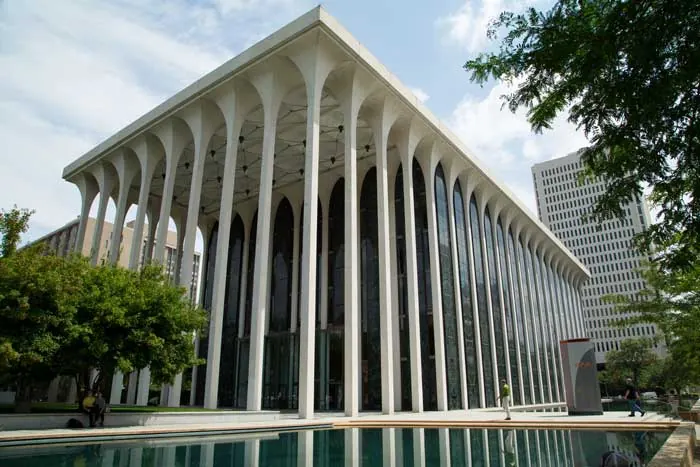
In the 1990s, the building underwent major renovations by BWBR Architects. The renovations maintained the integrity of Yamasaki's original exterior design. Today, the Reliastar Building stands as a premier example of modern architecture in Minneapolis.
Modeling the Exterior Columns and Beams
To model this distinct concrete facade in Rhino, we will start by creating vertical support columns.
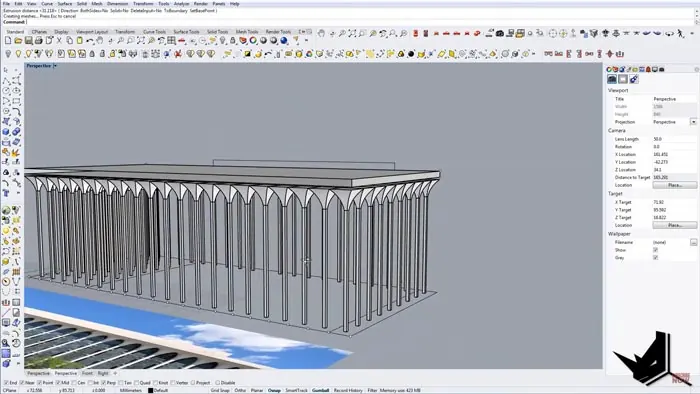
First, we import an image of the building facade to use as a reference. After scaling the image, we can count the number of column modules. There are 21 columns across the width of the building.
We create a line dividing the facade into 21 segments to represent one column module. By repeating this line vertically, we get the column layout.
Next, we draw guideline lines to mark the exterior edges and get the angles and heights correct. We can then build each column module as a simple box shape.
After rotating the box 45 degrees and using Sweep and Loft tools, we get the slanted ribbed shape of each concrete column. We copy the column module across the facade and adjust as needed to get even spacing.
Adding Windows, Detail, and Glass
Once the main concrete column and beam structure are in place, we add in the bands of horizontal windows. These windows give the facade its striped appearance.
We use surface extraction to get the window areas then extrude them inward slightly. For a bit more detail, we add slight recesses under the windows.
The entry area gets larger panes of glass. We model this with surface rectangles and then give the glass a bit more thickness.
Finally, we apply some simple materials like concrete, glass, and metal. The abstract, geometric building starts to come to life.
Rendering the Completed Reliastar Building Model
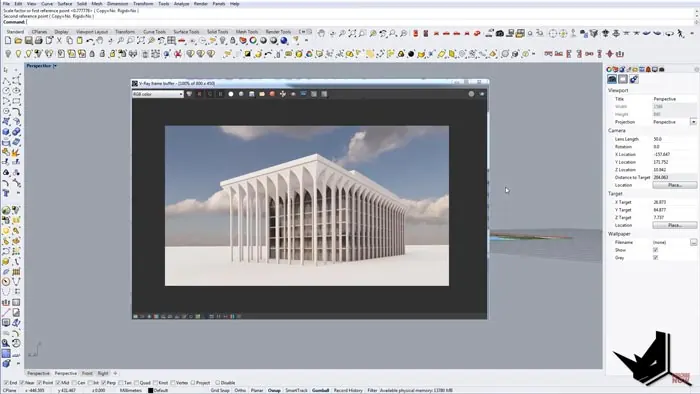
With the main structures modeled, we are ready to create a rendered view of our model. The rendered view brings out the depth and solid nature of the concrete exterior.
The rows of alternating solid columns and recessed windows create strong vertical lines and shadows. The glass entryway reflects the environment and adds interest.Following the step-by-step process, we were able to model this iconic example of modern architecture. Rhino's robust modeling and rendering tools make creating the Reliastar Building surprisingly straightforward.
The completed model clearly captures the monumental, geometric structure that makes thai building so recognizable on the Minneapolis skyline. Through modeling, we can gain a deeper appreciation for the repetitive patterns and textures of its facade.
Learn More About Architectural Modeling
This tutorial showed one approach to modeling a famous building in Rhino. To learn more about architectural modeling, be sure to check out upcoming workshops and tutorials.
Modeling architectural forms like the Reliastar Building takes practice. But Rhino's tools combined with some clever techniques make recreating real buildings an achievable skill.

Rhino for Architects Course
Give your architectural skillset a major boost with the Rhino for Architects Course. Get over 60 hours of focused training tailored specifically for architects. Master commands and techniques to model, render, and animate architectural visualizations at the highest level. Click below for more information and watch your designs come alive!