The sunflower has long been admired for its beauty and mathematical perfection. Architects around the world are now using the sunflower's natural form as inspiration to create visually stunning buildings. One such example is the remarkable Sunflower Tower located in Quito, Ecuador.
In this in-depth tutorial, we will show you step-by-step how to model the Sunflower Tower in Rhino. Along the way, you'll learn techniques that will help you design your own sunflower-inspired masterpieces.
An Overview of the Sunflower Tower Design
The Sunflower Tower was conceived and built by innovative Ecuadorian architects at OOG Architects. Their vision was to construct a residential high-rise that reflected the graceful spiral pattern seen in sunflower seeds and petals.
The most distinctive feature of the Sunflower Tower Design is the alternating lattice-like façade created by protruding apartments shaped like twisting sunflower petals. As the tower rises, the angle of the petal-shaped units shifts to follow the Fibonacci phyllotaxis - creating a beautiful logarithmic spiral effect.
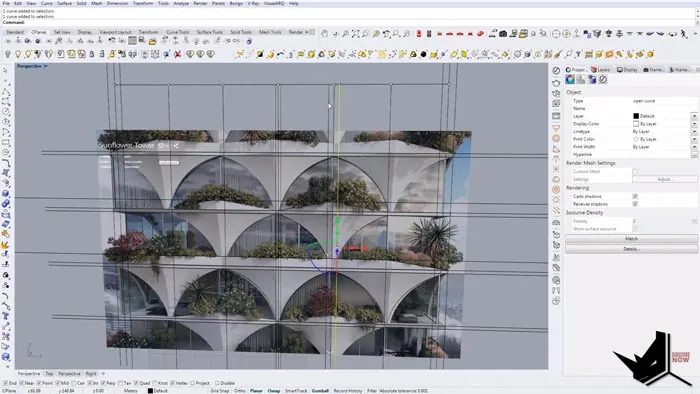
This was achieved using Rhino's powerful 3D modeling tools along with some clever techniques which we will cover next.
Step-by-Step Modeling
The first step is to set up reference lines in the Front View that will become the foundations for each floor plate.
After plotting out the basic grid, add in lines to indicate the positions of the sunflower petal modules.
Next, create surfaces for the initial floor plates using Curve Boolean operations. Extrude or use a command like Move Face to give them depth and stack each floor.
Once the core structure is in place, begin constructing the protruding sunflower petal units. Here you can take advantage of Rhino's ability to easily copy and rotate objects to quickly generate the "petals" for each level.
Some key steps include:
- Creating arcs and rectangles with Curve Boolean
- Using Rotate2D to angle alternating floors
- Mirroring petal units from side to side
- Sweeping rails to form 3D petals
- Capping ends with PlanarSrf and joining into solids
- Making wall surfaces using Offset or Extrude
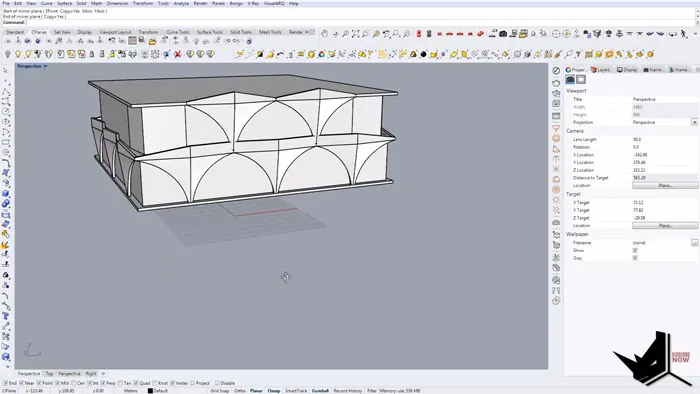
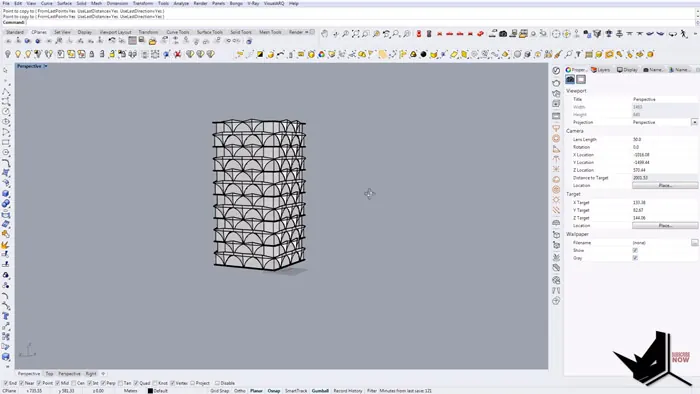
After completing one petal module, group it and copy it to speed up the process. The Rotate and Orient commands are also extremely helpful for perfectly lining up elements as you build upwards.
Within no time, you’ll have a basic model of the iconic Ecuadorian Sunflower Tower Design! Continue adding details like windows, railings, textures, and lighting to bring your design to the next level.
Tips for Modifying and Improving Your Sunflower Tower Design
Once the framework is set up, it’s simple to make adjustments. For example, you can go back and tweak the angles or shapes of the spiraling petals on different floors just by editing the original petal block.
You might also try producing variations by:
- Changing the number or density of petal modules
- Altering the heights between floors
- Adding curvature or bulges to the overall form
- Introducing atriums, sky gardens and other design elements
The sunflower offers infinite inspiration for architectural creativity!
Conclusion
We hope this step-by-step guide gave you insight into how the Sunflower Tower Design was modeled in Rhino. Mimicking the natural beauty of a sunflower may seem complex, but it can be broken down using simple commands and techniques.
Rhino’s flexibility empowers you to experiment with organic architecture and create one-of-a-kind buildings like the Sunflower Tower Design. Let the sunflower be your muse. Begin modeling your own signature flower-shaped towers today using the strategies you learned here!

Rhino for Architects Course
Give your architectural skillset a major boost with the Rhino for Architects Course. Get over 60 hours of focused training tailored specifically for architects. Master commands and techniques to model, render, and animate architectural visualizations at the highest level. Click below for more information and watch your designs come alive!