
The TriRemesh Component is one of the most useful new additions in the latest version of Grasshopper. This advanced meshing tool allows you to easily convert BREPs and meshes into optimized triangle meshes or quad-based meshes. In this guide, we’ll explore how the TriRemesh Component works and some of the powerful ways you can utilize it in your Grasshopper workflows.
Understanding the Basics of the TriRemesh Component
The TriRemesh Component is located in the Mesh tab under the Triangulation panel in Grasshopper. Once you have Rhino 7 or newer, it will be available.
This tool lets you convert a BREP or mesh into a mesh containing triangles of a similar size. It can also generate “dual” meshes made up of quad faces like hexagons with some pentagons and heptagons.
The component has several key inputs:
- Geometry - The BREP or mesh surface you want to convert
- Length - The target average triangle edge length
- Sharp - Preserve sharp edges of the input geometry
- Features - Curves that guide the mesh triangulation
The outputs provide both the triangle mesh and quad mesh options. There is also a naked edges output.
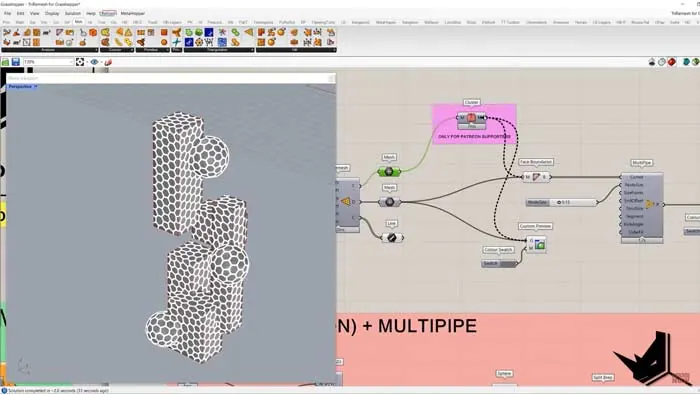
Some quick examples help show how it works. Converting a simple collection of surfaces to a unified triangle mesh produces clean results. With the “Sharp” input enabled, it maintains the crisp edges.
Changing the Length value provides more or less triangle density as needed. The quad mesh output generates the dual with mostly hexagons.
Leveraging Features Input for Precision Control
One of the most powerful aspects of the TriRemesh Component is the Features input. This allows you to guide the triangulation to follow specific curve shapes.
For example, you can split a surface manually, input the splitting curves to Features, and the output mesh will align perfectly with those splits. This level of control over the triangulation is extremely useful.
Taking it further, you can selectively remove mesh faces that fall inside specific curves. This lets you create meshes with precise holes and cutouts in predetermined locations.
Overall, the Features input gives you a tremendous level of control over the mesh topology when working with this component.
Combining with Other Tools for Advanced Effects
The meshes created by the TriRemesh Component can be utilized with other Grasshopper tools to generate unique geometries.
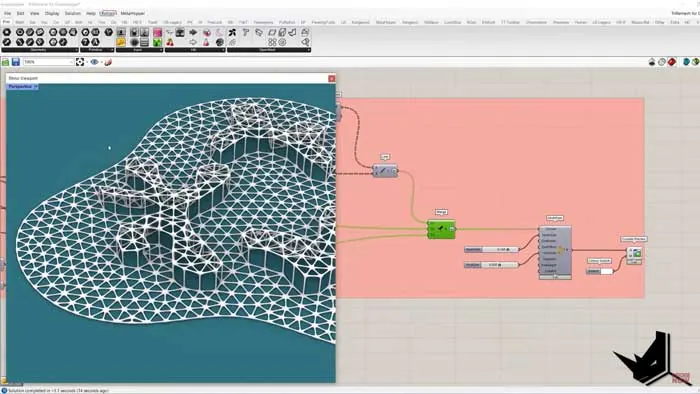
For example, extracting the boundary of a quad mesh and using it to drive the Multi-Pipe component results in subdivision-style objects. You can alternate between the triangle and quad outputs to get different looks.
It’s also possible to create animated deformations by moving select mesh vertices along their normals and reconstructing a new mesh. The TriRemesh meshes provide the perfect orderly point structure for this technique.
Don’t be afraid to experiment by combining the TriRemesh Component with your other favorite Grasshopper tools. There are limitless possibilities to explore.
Streamlining Workflows with the Target Input
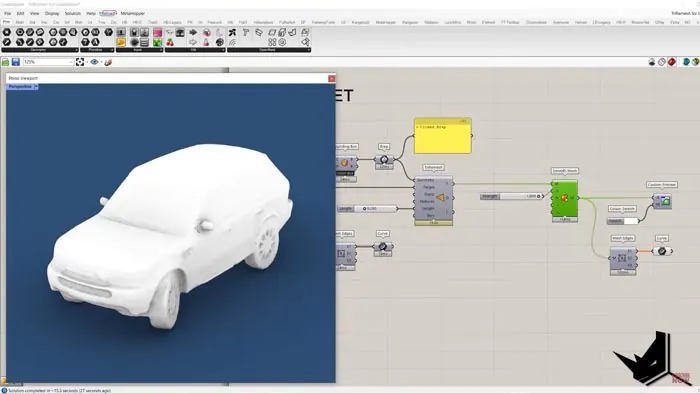
The Target input provides a handy way to automatically generate a clean wrap surface mesh from an existing messy mesh.
For example, you can take a mesh containing many naked edges and unusable geometry, and wrap it to a bounding box to generate a manifold mesh ready for 3D printing.
This allows you to quickly clean and optimize meshes without having to manually rebuild them from scratch. The Target input automates the busy work so you can focus on design.
Unlocking New Potential in Your Grasshopper Workflows
As you can see, the TriRemesh Component opens up many new modeling techniques and streamlining capabilities for your Grasshopper projects. Here are some key takeaways:
- Convert BREPs/meshes into clean triangle and quad meshes
- Guide mesh topology using curves with the Features input
- Combine with other tools like Multi-Pipe for unique effects
- Cleanup and optimize meshes quickly using the Target input
Spending time to experiment with the TriRemesh Component will pay dividends as you improve and accelerate your parametric modeling skills. The TriRemesh Component is one of the most versatile new tools introduced in Grasshopper.
To learn more about leveraging the power of the TriRemesh Component be sure to check out the full tutorial here.

Grasshopper Complete Course
Give your architectural skills a boost with the Grasshopper Complete Course. Get over 50 hours of comprehensive Grasshopper training tailored for architects. Learn to generate and iterate designs faster. Click below for more information and streamline your workflows!

![Rhino 7 New Features [Top 10]](/images/blog/featured/variants/rhino-7-new-features--related-card.webp?cb=seo-meta-20260227-164423)