Premium Library launch · Closes Tue May 26 at midnight
Launch closes · Tue May 26 at midnight

We have run 40 live Premium sessions over the past few years. For this launch only, you can take all of them home.

40 workshops and mini-courses. 214+ hours. Project files, Q&A, monthly live sessions. For this launch only, the entire library plus the next 12 months of Premium opens as one bundle.

40 sessions 214+ hours 24 more in the next 12 months Launch closes Tue May 26 midnight

Real architecture, modeled and rendered from scratch

You don't just learn the tools. You build ten real projects by recognized architects.

The mini-courses are not generic exercises. You build the actual buildings, alongside their original references, with the geometry, facade, materials, and environment included.

Fallingwater
Frank Lloyd Wright

Fallingwater

Full Rhino model from the waterfall site to the cantilevered slabs.

MC3 · Dusan Cvetkovic
Karlatornet
Entasis Arkitekter + SOM

Karlatornet, Gothenburg

Twisting tower with custom facade panels, modeled fully in Grasshopper.

MC9 · Lazar Djuric
Central Bank of Iraq concept
Zaha Hadid Architects

Central Bank of Iraq concept

The largest Grasshopper definition in How to Rhino history. ~900 components, deep data-tree work.

MC4 · Lazar Djuric
Dior Flagship Seoul
Christian de Portzamparc

Dior Flagship, Seoul

Sculpted SubD shells modeled from photographs. Flowing, fabric-like exterior.

MC5 · Dusan Cvetkovic
Aberdeen New Library
Schmidt Hammer Lassen

Aberdeen New Library

Patterned glass facade built in Grasshopper, broken down into adaptive parametric parts.

MC11 · Lazar Djuric
The Silo Copenhagen
COBE

The Silo, Copenhagen

400-component Grasshopper definition with Rhino 8 blocks for parametric facade cost estimation.

MC13 · Lazar Djuric
Redux House
Studio MK27 / Marcio Kogan

Redux House, São Paulo

Concrete + glass + wooden screens modeled in Rhino with blocks, then rendered photorealistically in V-Ray.

MC16 + MC17 · Dusan Cvetkovic
Manta Hotel concept
Vincent Callebaut

Manta Hotel concept

Full SubD topology with curved-panel facade detailing and mullion distribution.

MC19 · Dusan Cvetkovic
Y-Shaped Panel Facade inspired by UNStudio's Chicago Museum of Film
Inspired by UNStudio

Y-Shaped Panel Facade

Hexagonal grid Y-shaped panel facade with attractor-driven panel sizing. Modeled after UNStudio's Chicago Museum of Film proposal.

MC6 · Lazar Djuric
SoftStone Facade
SETUParchitecture, Tehran

SoftStone Facade

600-component pixelated stone facade in Grasshopper, with Anemone recursion and dynamic panel substitution.

W18 · Lazar Djuric

The tools we use across the catalog

Across 40 sessions, we use 48 plugins and software tools. Here is the full list.

Every tool below shows up in at least one workshop or mini-course. Some we teach from start to finish. Others we just use along the way. You won't find a list this long in one course.

20
Grasshopper plugins
Pufferfish
Offset, tween, blend, twisted-box morphing.
LunchBox
Panel systems: quad, diamond, triangle, staggered.
Weaverbird
Mesh subdivision: Catmull-Clark, loop, picture frames.
Anemone
Recursion loops for iterative parametric form.
Kangaroo
Physics simulation, relaxation, form-finding.
Nautilus
Scalar and vector fields, reaction-diffusion patterns.
Mesh+
Mesh field operations and advanced topology tools.
Heteroptera
Attractor-driven data and key allocation.
Telepathy
Wireless senders and receivers for clean canvases.
Elefront
Layer and attribute baking with metadata.
MetaHopper
Save and reuse component clusters and snippets.
NGon
N-gon polygon subdivision and meshing.
Human
Line visualization, value selectors, UI helpers.
4D Noise
Noise pattern generation for surfaces.
Parakeet
NURBS offsets and pattern generation.
Chromodoris
Mesh lofting and field-based operations.
ShapeMap
Pattern mapping on complex SubD surfaces.
Bifocals
Component name overlay for debugging.
TreeSloth
Path renumbering and tree manipulation.
Polyhedra
Geometric polyhedra generation.
5
Rendering & visualization engines
V-Ray
Industry-standard photorealistic renderer.
Chaos Corona
Alternative rendering engine to V-Ray.
D5 Render
Real-time architectural visualization.
Unreal Engine 5
Real-time rendering with Lumen and Nanite.
Cinema 4D
3D modeling and rendering with MoGraph.
16
AI tools at the 2026 frontier
Claude
Anthropic's LLM for code and text generation.
ChatGPT
OpenAI's LLM with image generation.
Gemini
Google's multimodal LLM.
Grok
xAI's LLM with real-time web search.
Midjourney
Text-to-image for design ideation.
Stable Diffusion
Open-source text-to-image with ControlNet.
Flux
Black Forest Labs generative image model.
ComfyUI
Node-based interface for diffusion workflows.
Hunyuan 3D
Tencent's text and image-to-3D model.
Cursor
AI-powered code editor for plugin building.
Lovable
AI no-code web app builder.
NotebookLM
Document Q&A and audio podcasts.
Perplexity
AI research with web search.
Comet
AI-native browser with task automation.
Nano Banana
Gemini image editor for architecture.
Raven
Grasshopper-native AI for parametric scripts.
2
Climate & simulation tools
Ladybug Tools
Climate analysis: wind, sun paths, radiation.
Honeybee Tools
Daylighting and thermal comfort orchestration.
5
BIM, documentation, fabrication
Revit
Industry-standard BIM modeling.
Illustrator
Vector diagrams and presentation graphics.
Photoshop
Image post-processing and editing.
RealityCapture
Photogrammetry to 3D models.
Bambu Studio
3D printer slicer software.

What you walk out able to do

Eight things you do not currently know how to do that you will after going through the catalog.

40 sessions, taught by working architects and by the people who build the plugins. Project files included with every session.

SoftStone parametric facade in Grasshopper01

Build a 600-component parametric facade in Grasshopper

Walk through a full 6-hour build of a stone facade with pixelated openings. You learn Anemone recursion, dynamic Split Mask logic driven by the parametric model, Polar coordinate sorting, Stream Filter for switching between design versions, and how to keep a 600-component definition organized. Inspired by SETUParchitecture's SoftStone project in Tehran.

W18 · Lazar Djuric
Complex architectural form modeled in SubD02

Model complex architecture in SubD

Three full mini-courses on Rhino 8 SubD modeling. Build a sci-fi fighter jet starting from a single line, sculpt Christian de Portzamparc's flowing Dior flagship in Seoul, and model Vincent Callebaut's Manta Hotel with its complex curved facade. Topology you can edit downstream, with full project files included.

MC1 + MC5 + MC19 · Dusan Cvetkovic
Galapagos multi-objective optimization in Grasshopper03

Run multi-objective optimization with Galapagos

A 4-day deep dive into how optimization actually works. Day 1: what is optimization. Day 2: how it works under the hood. Day 3: optimization applied to real Grasshopper definitions with the Galapagos solver. Day 4: live quiz. You walk out able to set up genomes and fitness functions, drive convergence, and optimize against geometric or climate-driven objectives.

W16 · Ognjen, Dusan, Lazar
Ladybug and Honeybee daylight and climate simulation04

Simulate daylight, climate, and thermal comfort

Take a real building model and run it through every major environmental analysis. Wind, sun paths, daylight autonomy, glare, and UTCI thermal comfort, using Ladybug Tools and Honeybee Tools in Grasshopper, with EnergyPlus and Radiance doing the heavy lifting under the hood. Two complete workshops, around 14 hours of structured analysis training.

W8 + W20 · Ricardo Ruiter Kanamori
ComfyUI workflow for architectural rendering05

Generate architectural visuals with ComfyUI

Two volumes, around 10 hours of hands-on workflow building. Set up ComfyUI from scratch, use Stable Diffusion and Flux models, leverage ControlNet for model-to-render conversions, and master inpainting for editing existing renders. You leave with ready-to-use ComfyUI templates including Flux and ControlNet that drop straight into your daily practice.

W6 + W9 · Omer Nuray
Raven AI plugin inside Grasshopper06

Use Raven AI inside Grasshopper

Raven is the AI built natively into Grasshopper, with awareness of the 900+ public Grasshopper plugins. You learn to manage context and prompt it, build a reusable library of your own clusters and snippets, and feed it simulation-informed feedback for grounded geometry generation. Taught directly by Moritz Rietschel, the co-creator of Raven.

W17 · Moritz Rietschel
Custom Rhino plugin built with AI pair programming07

Write your own Rhino plugin in C#

Even with zero coding experience. Set up Visual Studio with the RhinoCommon SDK, use Cursor and Claude as your AI pair programmer, and build two real plugins step by step: an image viewer panel for modeling reference, and a text-and-image-to-3D plugin powered by Tencent's Hunyuan model running locally on your GPU. Git/GitHub workflow included.

MC7 + MC12 · Dusan Cvetkovic
Parametric block-based facade driven from Grasshopper, inspired by Cobe's The Silo08

Drive an entire building facade from Rhino blocks in Grasshopper

Model nine unique Rhino blocks by hand, then let Grasshopper generate 57 scaled variations, place every panel on the building, attach a price-per-square-meter to each one, and read out the total facade cost live as you move a slider. Built on Rhino 8's new Model Object, Content Cache, and User Text components. Inspired by Cobe's The Silo in Copenhagen.

MC13 · Lazar Djuric

From August 2024 to today

Two years of live sessions, all on one continuous roadmap.

How to Rhino Premium launched in August 2024. Since then we have shipped 22 live workshops and 19 mini-courses, one of each every month, taught by our internal team alongside guest instructors who lead Premium sessions on their area of expertise.

The roadmap is the entire history laid out month by month. Some of the upcoming slots already have guest instructors confirmed and others we are still actively setting up. We continuously ask our Premium members which workshops and mini-courses they would like to see next, and the future roadmap is shaped around their answers.

Click the roadmap to view it full size in a new tab.

How to Rhino Premium roadmap: workshops and mini-courses from August 2024 to today Click to enlarge

What you actually unlock

One Premium subscription. Forty past sessions, twenty-four new ones, and a full year of access.

Premium is not a course playlist. It is a multi-year history of live sessions we taught with practicing architects, plus a forward calendar of 24 more sessions in the next 12 months. Here is the inventory you take home.

Two libraries inside · click to switch

20 recorded workshops ~95 hours total Live, project-based, recorded · 3 to 6 hours each
20 recorded mini-courses ~97 hours total Build the model or script with us, step by step · project files included

What is coming next

The next twelve months are already filling up.

Every month inside Premium, you get a new live workshop or mini-course. Here are the next named guest instructors and the topics we have already locked in. The rest of the calendar fills in as new sessions get scheduled.

6booked guest sessions 18more being scheduled 1new session every month
ChatGPT Images 2.0 + Nano Banana for Architects Jun 2026
AI · Image generation

ChatGPT Images 2.0 + Nano Banana for Architects

Compare the two leading text-to-image models for architectural workflows: prompting, editing, reference matching, and turning model exports into photoreal renders.

Dusan Cvetkovic
Dusan Cvetkovic Founder, How to Rhino
Upcoming workshop with Denisa Durica Jul 2026 Topic TBA
Computational design

Guest workshop with Denisa Durica

Topic and project files locked in next month. Expect a deep dive into algorithmic geometry, with the model built live from a real practice example.

Denisa Durica
Denisa Durica Guest instructor
Henning Larsen Tool for Environmental Design Aug 2026
Environmental analysis

Henning Larsen Tool for Environmental Design

A working session with the Henning Larsen Tool, an in-house Grasshopper toolkit for early-stage environmental analysis. Sun, wind, daylight, and embodied carbon, all from the same model.

Mariusz Hermansdorfer
Mariusz Hermansdorfer Head of Computational Design, Henning Larsen
Motif for Architects Sep 2026
Collaboration · Documentation

Motif for Architects

Motif is the new design and collaboration platform built by the team behind Dynamo and Revit. Build a project with us from concept through coordination, end-to-end inside Motif.

Matt Jezyk
Matt Jezyk Co-founder, Motif
Upcoming workshop with Robert Weaver Oct 2026 Topic TBA
Generative design · Fabrication

Guest workshop with Robert Weaver

Topic locks in closer to the date. Robert is known for blending computational geometry with material-aware fabrication, and the session will mirror his real production workflow.

Robert Weaver
Robert Weaver Guest instructor
Xfigura AI for Architects Nov 2026
AI · Generative design

Xfigura AI for Architects

A hands-on session with Xfigura, the AI platform purpose-built for architectural design. Image-to-3D, style transfer, and AI-assisted iteration inside a real project workflow.

George Guida
George Guida Co-founder, Xfigura

17 more sessions are being scheduled across the next 12 months. Mini-courses, group support calls, and Q&A drop in monthly while your membership is active.

The team behind How to Rhino

The people you are actually learning from.

Dusan Cvetkovic

Dusan Cvetkovic

Founder · Architect

Teaches Rhino modeling, rendering, and AI for architecture.

Lazar Djuric

Lazar Djuric

Co-founder · Architect

Teaches Grasshopper, parametric design, and computational logic.

872 paid course students 88,200+ on YouTube 102,104+ on Instagram 209,304+ in the broader community

Plus the guest tutors

Specialists who lead specific Premium sessions on their areas of expertise.

Premium pulls in working architects, plugin developers, and computational designers from outside the team to teach the topics they know best. Click any of their sessions in the inventory above to watch the intro video.

A note from the team

Why we are opening the Premium Library.

For the past few years, Premium has grown session by session. Active members get the new workshop and the new mini-course each month. People who join later can unlock individual past sessions at $97 each, but most do not, because the catalog is too long to chew through one unlock at a time.

We have never sold the historical library as a single bundle. It is the thing members ask about most often, and it is the thing we have not had time to package.

For the May 2026 launch, we are opening it once.

This is the first and only time we are bundling the entire historical library. After this launch, the bundle closes. We have no plans to bring it back.

After Tuesday, May 26 at midnight, the bundle goes away. Past sessions go back to individual $97 unlocks.

If you watched the May workshop, what we taught there is a slice of what is inside the Premium Library.

If you have been on the fence about Premium, this is the window. Once it closes, it stays closed.

Dusan & Lazar
Dusan Cvetkovic
Dusan CvetkovicFounder · Architect
Lazar Djuric
Lazar DjuricCo-founder · Architect
What changes during this launch

Normally, the historical library lives behind 40 individual unlocks at $97 each.

Normal price
$4,300
$97 × 40 past sessions + $35 × 12 months
Launch price · Closes May 26
$497
~$12 per session · ~$2.32 per hour
You save $3,803 88% off
Premium Library software package contents

Inside the Premium Library

Three ways to join during the launch window

Most people during this launch should take the Premium Library. The other two are listed in case they fit better.

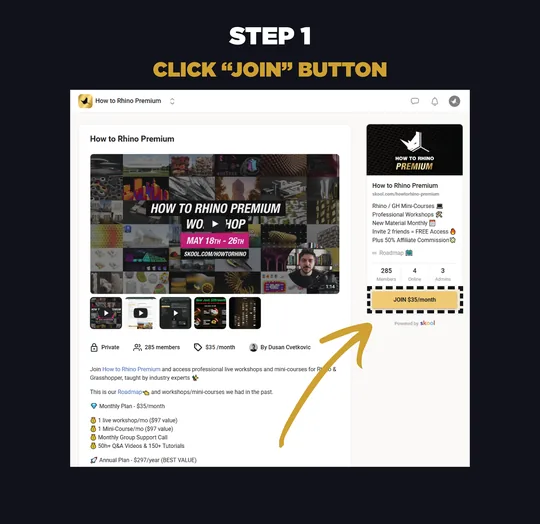
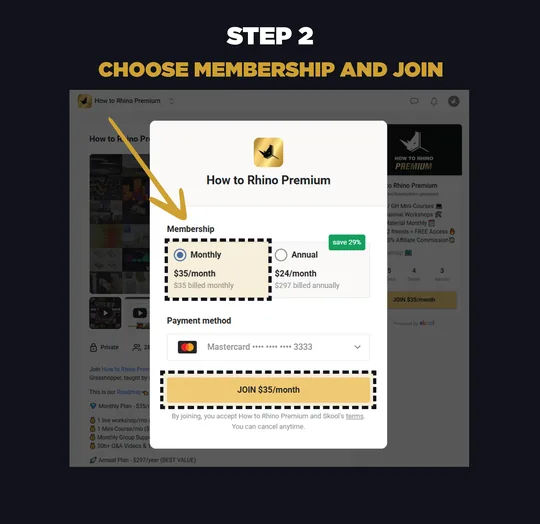
Monthly Premium

Try month by month

$35 / month

1 month of Premium membership

For people who want to come in for the May launch sessions and decide later. No automatic library access.

  • This month's workshop + mini-course
  • May launch week recordings
  • Group support while active
  • Premium community access
Join Monthly · $35

Past sessions stay at $97 each

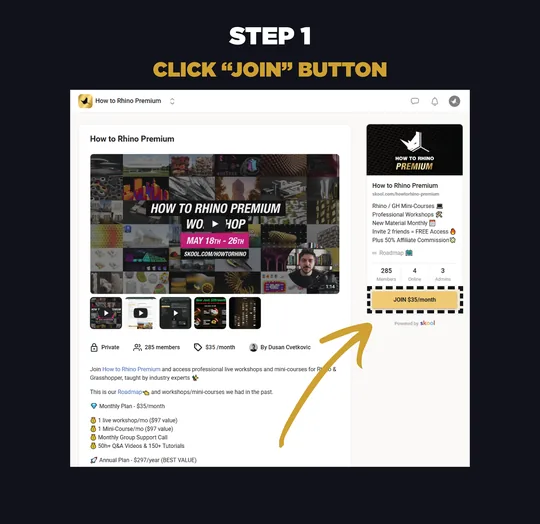
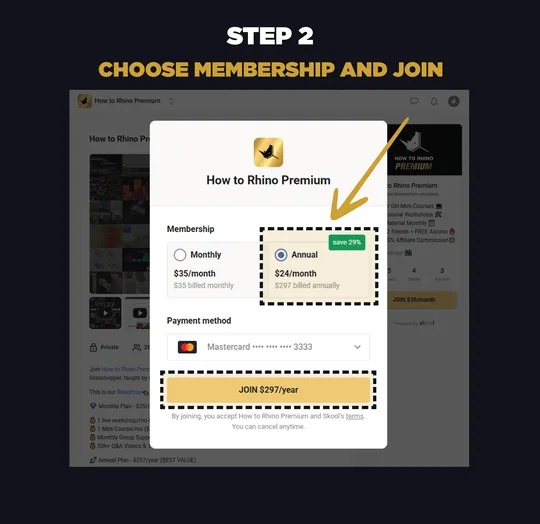
Annual Access

12 months + previous 6 months

$297 / year

12 months of Premium membership

For people who do not need the full historical library and just want recent content plus the next year.

  • 12 upcoming workshops + 12 upcoming mini-courses
  • Previous 6 months of Premium content
  • Group support + Q&A library
  • Premium community access
Join Annual · $297

Back-catalog access within 12-24 hours

* Note for monthly members: the Library bundle requires annual. You upgrade to annual first, then we send the $200 unlock link inside the group. Click any Library button above for the full walkthrough.

Launch closes

A once-in-a-lifetime chance to take home the entire Premium Library.

After the clock hits zero, the bundle is gone. Past sessions go back to $97 each, and we are not planning to run this offer again.

-- Days
-- Hours
-- Minutes
-- Seconds

Closes Tuesday, May 26, 2026 at midnight

Questions buyers actually ask

FAQ

When does the launch close?

Tuesday, May 26, 2026 at midnight CEST. After that, individual past sessions go back to $97 unlocks. We are not planning to run the Premium Library bundle again.

Why is the historical library cheaper as a bundle?

Each historical session normally unlocks individually for $97 because each is a multi-hour, project-based session that took weeks of work to record and edit. We have never sold them as a single bundle before. The launch price is a one-time founding-member deal, not a permanent change.

What is the difference between $297 and $497?

$297 gets you 12 months of Premium plus the previous 6 months. $497 gets you 12 months of Premium plus the entire historical library, every past Premium session we can grant. If you are new and only need recent content, $297 covers you. If you want to catch up on years of past sessions, $497 is the path.

Why is the $35/month plan still here?

The $35/month plan is unchanged, it is the same Premium membership we have always offered. For $35 you get access to that month's workshop and that month's mini-course, plus the project files and the community.

For May specifically that means access to the May launch workshop and project files. The same applies every month after that, one new workshop and one new mini-course. As long as you stay subscribed you keep access to every month you have been a member, so the longer you are in, the more your library grows.

Monthly does not include the historical back-catalog automatically. Individual past sessions stay at $97 each unless you upgrade to Annual or the Premium Library.

Is checkout on this website?

No. Checkout happens inside Skool. This page sends you to the right Skool plan. Skool is where the Premium community already lives.

How fast do I get access?

Skool and Premium membership access is immediate, the moment your checkout goes through you are in the group.

The Library and back-catalog unlocks are granted by hand because Skool does not support add-on products, so one of us (Dusan or Lazar) needs to manually open up the past sessions on your account. The 12 to 24 hour window is the worst case. In practice, if one of us is online when you purchase, we unlock you within minutes.

Either way, do not worry, you will get access for sure. As soon as we see your message inside the group we open everything up.

Is this the same as the free May workshop?

No. The free May workshop is a teaching event we run during the launch, and what we cover there is a small slice of what is inside Premium. You get a taste of the topics, the format, and the way we teach, but not the full picture.

The Premium Library is the paid catalog of everything we have taught over the last few years: all 40 past workshops and mini-courses, project files, extended tutorials, plus the next 12 months of new sessions and the community. The May workshop shows you a few pieces. Premium gives you the whole library.

I'm already in Premium. What do I do?

During the launch, active Premium members can add the $200 Premium Library Upgrade on top of their existing membership. What you need to do depends on which plan you are on right now.

If you are on the $297 annual plan, you only need to pay the $200. Send us a quick message inside the group (or by email) telling us you want the Library upgrade, and we send you the $200 payment link. Once you pay, we unlock the full historical library on your account.

If you are on the $35 monthly plan, there is one extra step. The Library upgrade requires the annual plan, so you first switch your subscription from monthly to annual inside Skool (Settings → Membership → Change plan → Save 29% by switching to annual). Once your annual upgrade goes through, message us and we send the $200 payment link the same way.

Click the Unlock the Library button on the pricing card for the full step-by-step walkthrough with screenshots. Your existing billing timeline is unchanged either way, the $200 is a one-time payment on top of your membership.

Does the $200 upgrade extend my annual subscription?

No. The $200 Library upgrade is a one-time payment that unlocks the historical library on your account, it does not add another 12 months and it does not reset your renewal date. Your annual subscription continues exactly on the timeline it is already on.

For example, if you joined annual 7 or 8 months ago, you still have about 4 to 5 months left on your year. Paying the $200 unlocks the entire back-catalog right now, but your next annual renewal is still on the same date it was before.

Library access is tied to an active Premium membership. As long as you keep your subscription active (monthly or annual), the library stays unlocked. If you cancel and your Premium membership ends, library access ends with it.

Refunds?

No refunds for this launch.

Are prices in USD?

Yes. Skool handles tax/VAT where applicable.

What if I have trouble joining or picking a plan?

Email us at [email protected]. We answer.

Launch closes Tuesday, May 26 at midnight

Take 40 sessions home for $497.

After this window, the bundle goes away. Past sessions go back to $97 each.

Unlock the Premium Library · $497
Or · $297 annual · $35 monthly · $200 existing-member upgrade