Grasshopper is a powerful parametric modeling tool for Rhino. However, it works primarily with metric units. This can cause headaches for users who prefer imperial units like feet and inches. Thankfully, there is an easy workaround to get imperial values into Grasshopper-compatible decimals.
The Challenge of Imperial Units in Grasshopper
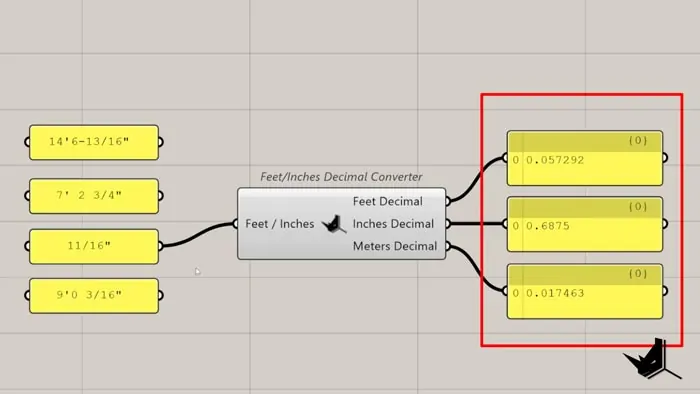
As a metric-centric program, Grasshopper takes number inputs through sliders and panels. This makes entering imperial units in Grassshopper a bit tricky. While you can manually convert feet and inches to decimals, it's inefficient. Fortunately, we can build a simple Grasshopper component to handle the conversion automatically.
Imperial Units in Grasshopper Converter Steps
Follow these steps to create a custom Grasshopper component for imperial units:
- Place each imperial value (feet, inches, fractions) in separate branches.
- Categorize the data by values with feet vs. just inches. Use a single quotation mark to separate feet from inches.
- Split out the feet and inch values into separate indexes.
- Replace missing values with zeroes.
- Remove unnecessary zeros from the inches list.
- Trim the data lists to match up values.
- Merge the feet and inches lists into one master list.
- Replace dashes with spaces to standardize the format.
- Split inches from fractions using spaces as dividers.
- Convert numbers to decimals with the Number panel.
- Sum fractions and inches using addition component.
- Multiply feet by 12 and add to summed inches for total inches.
- Divide inch total by 12 and add to feet for total feet.
- Multiply inches by 0.0254 to convert to meters.
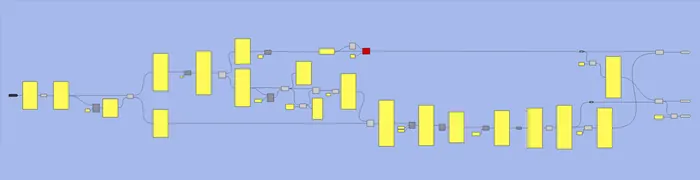
Download the Imperial Converter Here
If you'd like to follow along with the tutorial and use our imperial converter component, you can download it here. Just let us know where you'd like us to send it...

Grasshopper Complete Course
Give your architectural skills a boost with the Grasshopper Complete Course. Get over 50 hours of comprehensive Grasshopper training tailored for architects. Learn to generate and iterate designs faster. Click below for more information and streamline your workflows!