Architecture is one of the most hardware-intensive professions in the creative industry. Between 3D modeling in Rhino, rendering in V-Ray, running BIM workflows in Revit, and preparing presentation boards in Photoshop, your laptop needs to handle serious computational loads without breaking a sweat. Choosing the wrong machine can mean hours lost to slow renders, laggy viewports, and crashed files.
In this guide, we will break down exactly what hardware specifications matter for architecture work in 2026, and then recommend five laptops that deliver the best performance across different budgets and use cases. Whether you are a student building your first portfolio or a licensed architect running a practice, this guide will help you make an informed decision.
What to Look for in a Laptop for Architecture
Before diving into specific models, let's cover the five key components that determine how well a laptop handles architecture software. Understanding these will help you evaluate any laptop, not just the ones on this list.
Processor (CPU)
The processor is the brain of your laptop and directly impacts how fast your software runs. For architecture work in 2026, you want either an Intel Core Ultra (Series 2, formerly 14th Gen) or an AMD Ryzen 9000 series processor. Both offer excellent multi-core performance for rendering and single-core speed for real-time modeling.
When you are working in Rhino or SketchUp, the software primarily uses a single CPU core for viewport operations, so high single-core clock speeds matter. But when you hit render in V-Ray, Enscape, or Lumion, multi-core performance takes over. Look for processors with at least 8 cores and 16 threads. The Intel Core Ultra 9 and AMD Ryzen 9 9950X are the top choices, but the Core Ultra 7 and Ryzen 7 9800X3D also deliver excellent results at lower price points.
Graphics Card (GPU)
The GPU handles everything visual: viewport performance, real-time rendering, ray tracing, and GPU-accelerated renders. For architecture in 2026, the NVIDIA RTX 4000 and RTX 5000 series GPUs are the standard. These cards support hardware ray tracing, which dramatically speeds up architectural visualization in tools like V-Ray, Enscape, and Twinmotion.
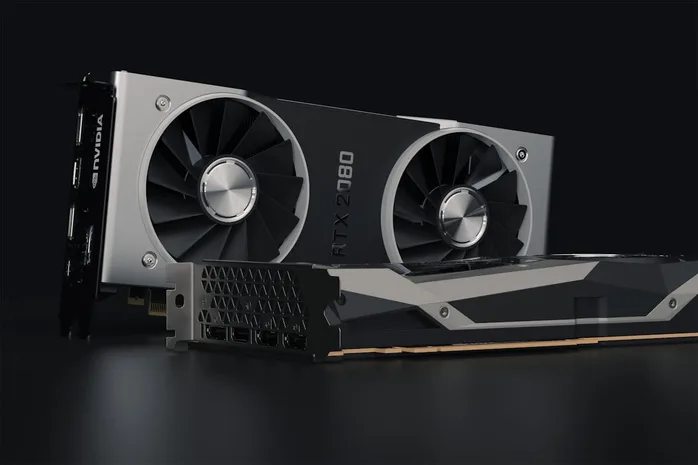
For professional workstation laptops, look for NVIDIA RTX Ada series GPUs (RTX 2000 Ada, RTX 3000 Ada, RTX 4000 Ada). These come with ISV-certified drivers that are tested and optimized for CAD and BIM applications like Rhino, Revit, AutoCAD, and ArchiCAD. For more budget-friendly options, consumer NVIDIA RTX 4060 or RTX 4070 laptop GPUs also work well, though they lack ISV certification.
Avoid laptops with only integrated graphics (Intel Iris Xe, AMD Radeon). These simply cannot handle complex 3D models with thousands of surfaces, heavy material textures, or real-time architectural rendering.
RAM (Memory)
RAM determines how much data your laptop can hold in active memory at once. Architecture projects tend to grow large, especially when you combine 3D models, texture maps, linked Revit files, and open browser tabs for reference images. In 2026, 32GB is the minimum you should consider. If you regularly work on large-scale projects, campus plans, or complex parametric designs in Grasshopper, aim for 64GB.
DDR5 memory is now standard on modern laptops and offers faster data transfer speeds compared to DDR4. Make sure the laptop you choose supports DDR5, and ideally check whether the RAM is user-upgradeable. Some ultrabook-style laptops solder the RAM to the motherboard, which means you are stuck with whatever you buy. Workstation laptops like the Dell Precision and Lenovo ThinkPad P series typically offer SODIMM slots for easy upgrades.
Storage
Get an NVMe PCIe Gen 4 SSD with at least 1TB of capacity. Architecture project files, especially those with embedded textures and linked references, can easily consume tens of gigabytes per project. An NVMe SSD provides read speeds of 5,000+ MB/s, which means faster file loading, quicker software launches, and shorter autosave times.
If your budget allows, consider a laptop with two SSD slots so you can add more storage later without replacing your primary drive. Avoid traditional hard disk drives (HDDs) entirely as they are far too slow for modern architecture workflows.
Display
The display is often overlooked, but for architects it matters significantly. You will spend hours looking at your screen while modeling, detailing drawings, and preparing presentations. Look for these display features:
- Resolution: At least 2560x1600 (QHD+). 4K (3840x2400) is ideal for seeing fine details in drawings and models. Avoid 1080p displays for primary architecture work.
- Color accuracy: Look for 100% sRGB coverage at minimum. Displays with DCI-P3 coverage (common on OLED panels) provide a wider color gamut, which is valuable when preparing presentation renderings and graphics.
- Size: 16-inch displays offer a good balance between screen real estate and portability. If you primarily work at a desk, you can always connect an external monitor.
Top 5 Laptop Picks for Architecture in 2026
Based on the specifications above, here are our top five recommendations for architecture laptops, ranging from professional workstations to creative powerhouses.
1. Dell Precision 5690
Dell's Precision line has long been the gold standard for professional workstation laptops, and the Precision 5690 continues that legacy. It is built from the ground up for CAD, BIM, and 3D modeling workflows, with ISV certifications for Rhino, Revit, AutoCAD, SolidWorks, and other architecture software.

The Precision 5690 can be configured with Intel Core Ultra 9 processors, up to NVIDIA RTX 3000 Ada professional graphics, and up to 64GB of DDR5 RAM. The 16-inch display is available in both UHD+ (3840x2400) and OLED options with excellent color accuracy. At around 1.8 kg (4 lbs), it is surprisingly portable for a workstation-class machine.
Best for: Professional architects who need ISV-certified reliability, corporate IT compatibility, and top-tier build quality. The Dell Precision line is the safe choice that will never let you down on a deadline.
Starting price: Around $2,200 (configurations vary significantly based on GPU and display options).
2. HP ZBook Studio G11
The HP ZBook Studio G11 is Dell's closest competitor in the professional workstation space, and in many ways it matches or exceeds the Precision. HP's DreamColor display technology is a standout feature, offering factory-calibrated color accuracy that architects and visualization specialists will appreciate.

Configurations include Intel Core Ultra 7/9 or Intel Xeon processors, NVIDIA RTX 2000/3000/4000 Ada professional GPUs, up to 64GB DDR5, and NVMe storage. The ZBook Studio also supports HP's Z Turbo Drive for ultra-fast storage performance. Like the Dell Precision, it carries full ISV certifications.
If you need even more power, the HP ZBook Fury G11 steps up with larger chassis, higher-wattage GPUs, and options for 128GB RAM. It's heavier but ideal for architects running massive BIM models or coordinating multi-discipline projects.
Best for: Architects who prioritize display quality and color accuracy for presentations and client deliverables. The DreamColor display is genuinely best-in-class.
Starting price: Around $2,000 for the ZBook Studio; around $2,800 for the ZBook Fury.
3. ASUS ProArt P16
The ASUS ProArt P16 represents a newer category of creator-focused laptops that blur the line between consumer and professional machines. It offers workstation-level performance at a significantly lower price point than traditional workstation laptops.
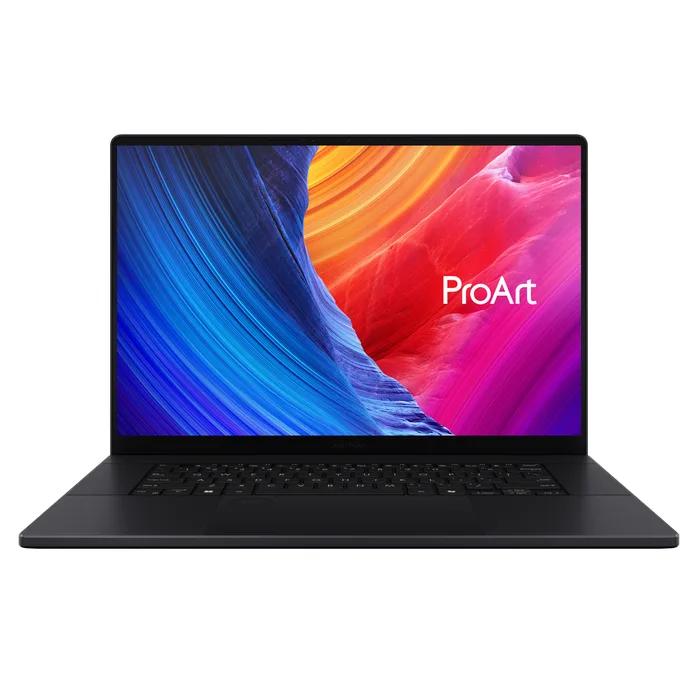
Image courtesy of ASUS
The ProArt P16 features an AMD Ryzen AI 9 HX 370 processor, NVIDIA GeForce RTX 4070 laptop GPU, 32GB of LPDDR5X RAM, and a stunning 16-inch 4K OLED display with 100% DCI-P3 coverage. The OLED panel delivers perfect blacks, vibrant colors, and HDR support that makes architectural renderings look incredible.
The main trade-off compared to Dell and HP workstations is the lack of ISV certification and professional-grade GPU drivers. The consumer RTX 4070 performs very well in practice, but if your office requires ISV-certified hardware, this may not be the right choice. For students and independent architects, however, the ProArt P16 offers exceptional value for money.
Best for: Architecture students and freelance architects who want top-tier performance and an outstanding OLED display without paying workstation prices.
Starting price: Around $1,800.
4. Apple MacBook Pro with M4 Pro / M4 Max
The MacBook Pro with Apple's M4 Pro or M4 Max chip has changed the conversation about Macs in architecture. For years, Macs were considered underpowered for serious 3D work. That is no longer the case. The unified memory architecture in Apple Silicon means the CPU and GPU share the same pool of high-bandwidth memory, eliminating the bottleneck that plagued older Intel Macs.
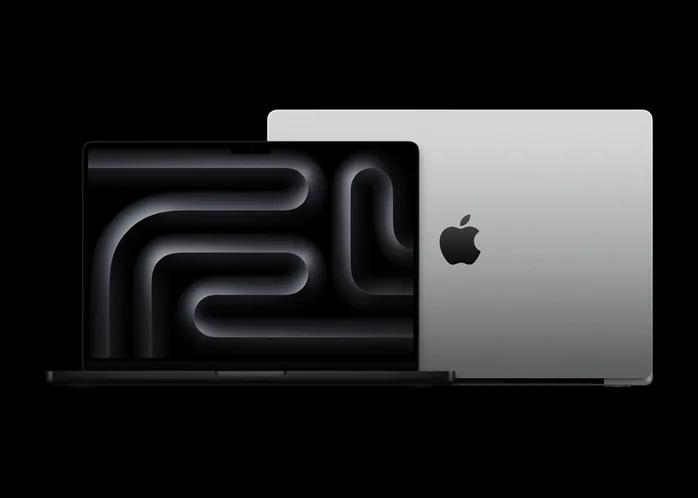
Image courtesy of Apple
The M4 Pro (with 24GB or 48GB unified memory) handles Rhino, SketchUp, and most rendering tasks with ease. The M4 Max (with 48GB, 64GB, or 128GB unified memory) is a rendering powerhouse that can compete with high-end dedicated GPUs. Battery life is exceptional at 18+ hours, and the 16-inch Liquid Retina XDR display offers outstanding color accuracy.
The important caveat: software compatibility. Rhino 8 runs natively on macOS and performs excellently on Apple Silicon. SketchUp, Blender, Cinema 4D, and Adobe Creative Suite all run natively as well. However, Autodesk Revit is not available on macOS. If Revit is central to your workflow, you will need a Windows machine or run Windows through Parallels (which adds complexity and performance overhead). AutoCAD has a macOS version but with reduced features compared to Windows.
Best for: Architects who primarily use Rhino, SketchUp, or Blender and value battery life, build quality, and the macOS ecosystem. Not recommended if Revit is your primary BIM tool.
Starting price: Around $2,499 for the M4 Pro 16-inch; around $3,499 for the M4 Max.
5. Lenovo ThinkPad P1 Gen 7
The Lenovo ThinkPad P1 Gen 7 is the thinnest and lightest ISV-certified workstation on this list. At just 1.81 kg (3.99 lbs) and under 18mm thick, it is designed for architects who are constantly moving between the office, construction sites, and client meetings.
Under the hood, it packs Intel Core Ultra 9 processors, NVIDIA RTX 3000 Ada professional graphics, up to 64GB DDR5 RAM, and dual SSD slots for up to 8TB of storage. The 16-inch display comes in 2.8K OLED or 4K IPS options, both with excellent color accuracy. Lenovo's legendary ThinkPad keyboard is a bonus for architects who spend significant time typing specifications, emails, and documentation.
The ThinkPad P1 carries full ISV certifications for Rhino, Revit, AutoCAD, and other architecture software. It also includes enterprise security features like a fingerprint reader, IR camera for Windows Hello, and optional smart card reader.
Best for: Architects who need a certified workstation in the most portable form factor possible. If you travel frequently or work from multiple locations, the P1 Gen 7 is hard to beat.
Starting price: Around $2,100.
Budget Options for Architecture Students
If you are an architecture student working with a limited budget, you do not necessarily need a $2,000+ workstation. Here are some strategies to get solid performance without overspending:
- Consider refurbished workstations. Previous-generation Dell Precision, HP ZBook, and Lenovo ThinkPad P series laptops can be found refurbished for 40-60% less than new prices. A two-year-old workstation with an RTX A2000 GPU and 32GB RAM will still handle architecture software very well.
- Look at gaming laptops with RTX 4060+ GPUs. Laptops like the Lenovo Legion, ASUS TUF, or Acer Nitro offer strong NVIDIA GPUs at lower prices than workstations. They lack ISV certification, but for student work this rarely causes issues.
- Prioritize RAM and GPU over CPU. If you have to compromise somewhere, get a laptop with at least an RTX 4060 GPU and 16GB of RAM (upgradeable to 32GB). A slightly older i7 CPU paired with a good GPU will outperform a newer i9 with weak integrated graphics.
- Minimum viable specs for 2026: Intel Core i7 (12th Gen or newer) or AMD Ryzen 7, NVIDIA RTX 3060 or better, 16GB RAM (with upgrade path to 32GB), 512GB NVMe SSD.
What to Avoid
Equally important is knowing which laptops to skip entirely for architecture work:
- Chromebooks: These run ChromeOS and cannot install native architecture software like Rhino, Revit, or AutoCAD. Cloud-based CAD tools exist but are not mature enough for professional architecture work.
- Ultra-thin consumer laptops with integrated graphics: Machines like the Dell XPS 13, MacBook Air, or HP Spectre x360 are great for email and web browsing, but their integrated GPUs cannot handle 3D modeling or rendering workflows.
- Laptops with soldered, non-upgradeable 8GB or 16GB RAM: Architecture software is memory-hungry. If you buy a laptop with 8GB of soldered RAM, you will hit a wall within your first semester. Always verify that RAM is either sufficient (32GB+) or upgradeable before purchasing.
- Laptops older than 3 years: GPU and CPU performance has improved significantly with each generation. A 2022 laptop may seem like a bargain, but it will struggle with modern rendering engines and increasingly complex BIM models.
Making Your Decision
The right laptop for you depends on three factors: your primary software, your workflow, and your budget.
If you work primarily in Revit and AutoCAD, stick with a Windows ISV-certified workstation like the Dell Precision 5690, HP ZBook Studio G11, or Lenovo ThinkPad P1 Gen 7. If Rhino and Grasshopper are your main tools, both Windows workstations and the MacBook Pro M4 are excellent choices. For students on a budget, the ASUS ProArt P16 or a refurbished workstation offer the best value.
No matter which laptop you choose, make sure it has at least 32GB of RAM, a dedicated NVIDIA GPU, and an NVMe SSD. These three components are non-negotiable for a smooth architecture workflow in 2026.
Have questions about choosing the right laptop for your architecture workflow? Get in touch and we will be happy to help you find the perfect fit.
Related Resources

Rhino for Architects Course
Give your architectural skillset a major boost with the Rhino for Architects Course. Get over 60 hours of focused training tailored specifically for architects. Master commands and techniques to model, render, and animate architectural visualizations at the highest level. Click below for more information and watch your designs come alive!