The way professionals build businesses online has changed. The old model of running ads, building funnels, and selling one off courses is being replaced by something more sustainable. Paid communities. A community of paying members gives you predictable monthly revenue, deeper relationships with your audience, and a feedback loop that makes everything you create better over time.
The platform that has quietly become the default home for these communities is Skool. If you have spent any time on YouTube or LinkedIn in the past two years, you have almost certainly seen creators talking about it. There is a good reason for that. Skool combines a discussion forum, a classroom for hosting courses, a calendar for live events, gamification, group chat, video hosting, and built in payments into a single product. It replaces five or six tools at once.
We have been running our own paid community, How to Rhino Premium, on Skool for years. Hundreds of architects, designers, and engineers gather there to share work, get feedback, and follow our weekly mini courses and live workshops. Choosing Skool was one of the best business decisions we have made.
This is the complete 2026 guide to building a profitable community on Skool. We will cover what Skool actually is, how every major feature works, the full pricing breakdown, every monetization option available to you, the built in affiliate system, and a step by step plan to launch your own community in under 30 minutes. By the time you finish, you will know whether Skool is the right choice for your business and exactly how to get started.
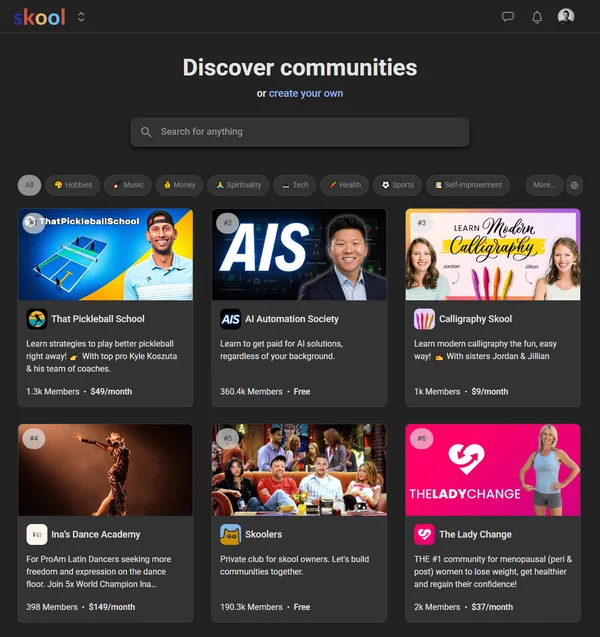
What is Skool?
Skool is an all in one community platform that brings a discussion forum, a course hosting classroom, a live events calendar, gamification mechanics, member to member chat, unlimited video hosting, email broadcasts, and a built in payment processor into a single product. It was founded in 2019 by Sam Ovens, the entrepreneur behind Consulting.com, and is now backed by Alex Hormozi of Acquisition.com, who joined as a partner and has helped accelerate its growth.
The reason Skool has become the platform of choice for creators, coaches, and skilled professionals is simple. Most other tools force you to stitch together five or six services to run a paid community. You need a forum, a course platform, an email tool, a payment processor, a video host, and an event scheduler. Each one has its own login, billing, and learning curve. Skool replaces all of them with a single tab in your browser.
The product feels almost old fashioned in how focused it is. There is one feed where members post and discuss. There is one classroom where members watch your courses. There is one calendar where members see your events. There is one chat where members message each other. That simplicity is the point. Members do not get lost in a maze of features, and you do not lose hours every week managing tools.
In 2026, Skool rolled out several major upgrades that made the platform even more useful for serious creators. Freemium tiers, multiple pricing levels, and standalone Buy Now courses are now built in. This means you can mix free and paid memberships in the same group, sell individual courses outside the main subscription, and offer different price points for different audiences without adding a single integration.
Why We Run Both Our Communities on Skool
We have been creating Rhino, Grasshopper, and architecture content since 2011, and we now run two separate communities on Skool. The first is our free How to Rhino community, which is open to anyone who wants to join, follow our tutorials, and connect with other architects and designers. The second is How to Rhino Premium, our paid membership where subscribers get full access to weekly mini courses, live workshops, and the complete classroom library. Both groups run from the same Skool account, side by side, and we manage them from the same dashboard.
By the time we decided to launch the paid community in 2022, we had tried almost every alternative. Facebook Groups were impossible to monetize cleanly. Discord lacked any real way to host courses or charge for access. Mighty Networks had the features but felt heavy and slow. Circle was decent but felt like another social network rather than a focused learning environment.
We chose Skool because it solved the three problems that mattered most to us.
First, we wanted predictable monthly revenue. Skool subscriptions handle billing automatically. Members get charged on the same date every month, and the dashboard shows us exactly what we will earn before the month begins. We no longer needed to launch a new course every quarter just to keep the lights on.
Second, we wanted everything in one place. Our members come for the courses, but they stay for the community. On Skool, both live side by side. A student watching a tutorial can ask a question in the comments, get a reply from us or another member, and then jump into a live workshop the next day, all without leaving the platform. That continuity is what turns a course library into a real community.
Third, we wanted a platform that does not get in the way. Skool has a refreshingly simple interface. You can sign up, log in, and find what you need without a tutorial. That matters when your members are professionals who do not want to spend their evenings learning how to navigate a community app.
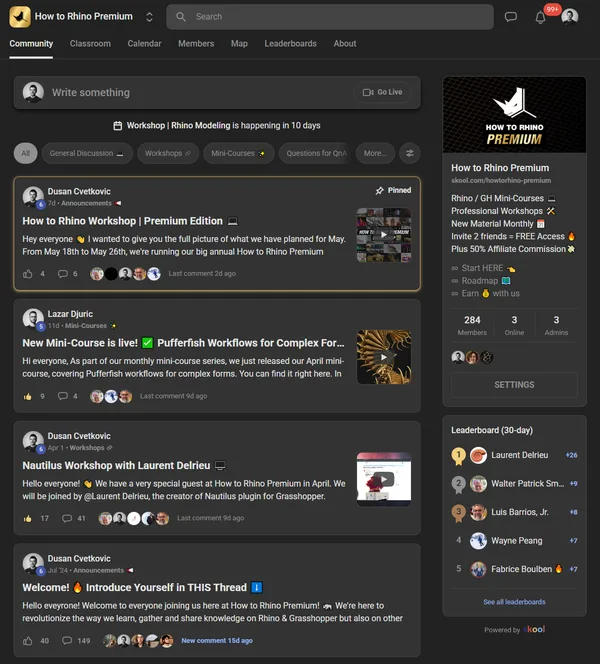
The result has been exactly what we hoped for. Our community is consistently one of the most engaged groups on Skool in our category, members renew at high rates, and we run the entire premium business on a single tab in our browser.
If you have an audience and expertise in any field, this same model works. Skool is not specific to architecture, design, or any one industry. It is a foundation, and what you build on top of it is entirely up to you.
Skool's Core Features
Skool has fewer features than most of its competitors, and that is a deliberate design choice. Every feature on the platform is one that paid communities actually use, and nothing is bolted on for the sake of a marketing page. Here is a complete tour of what you get.
The Community Feed
The heart of every Skool group is the community feed. Members post questions, share work, start discussions, and respond to each other in a familiar threaded forum format. You can pin important announcements, organize posts into categories (sometimes called channels in other platforms), and let members react with likes and replies. There are no algorithms, no shadow bans, and no ads. Members see your posts in chronological order, the way social media used to work before everything got sorted by an algorithm.
Posts can include images, embedded YouTube and Loom videos, polls, links, and code blocks. We use the feed daily to share new tutorials, answer student questions, and collect feedback on what to teach next.
The Classroom (Unlimited Courses)
The classroom is where you host your courses, and it is one of the most underrated parts of Skool. You get unlimited courses, unlimited modules, and unlimited video hosting, all included in the base subscription. There are no per student fees, no extra charges for video bandwidth, and no separate learning management system to integrate.
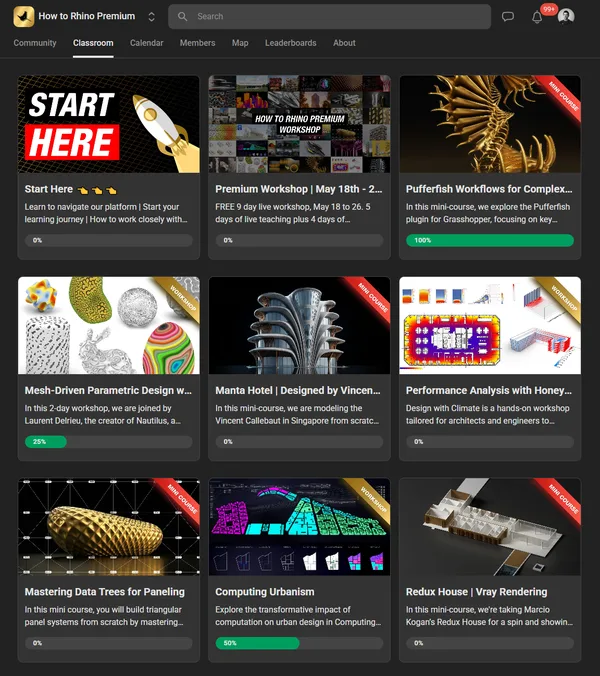
Each course is structured into modules, and each module contains lessons. A lesson can be a video, a text article, a downloadable file, or a combination. Videos play in HD, support automatic captions, include playback speed controls, and let members track their progress through the course. The classroom is clean enough that you could replace a $99 a month course platform with it on day one.
Calendar and Live Events
Every Skool group has its own calendar. You can schedule live events directly in Skool, including live rooms that support up to 10,000 attendees, and members get email reminders before each event. You can also embed Zoom, Google Meet, or any other video conferencing tool, but most communities never need to.
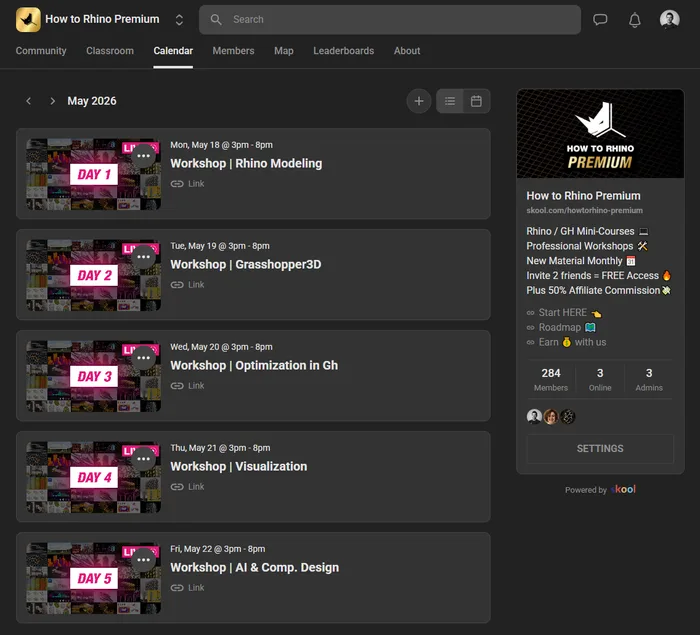
For our premium community, the calendar is where we publish weekly office hours, monthly workshops, and guest expert sessions. Members RSVP, get reminders, and attend without ever leaving the platform.
Gamification and Leaderboard
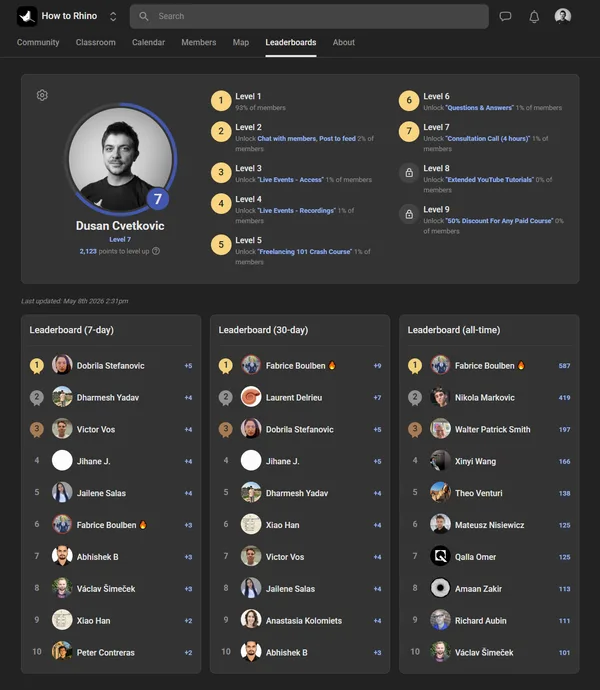
This is where Skool quietly outperforms almost every other community platform. Every action a member takes earns points, and members level up as they accumulate points. There is a leaderboard, weekly and all time rankings, and badges that display next to a member's name.
It sounds gimmicky until you see what it does to engagement. Members come back daily because they want to climb the leaderboard. Lurkers turn into contributors because posting earns points. Top members feel recognized, and everyone else has a clear path to becoming a top member. Gamification is one of the strongest reasons retention on Skool tends to be higher than on the alternatives.
Group Chat and Direct Messages
Members can message each other directly, and admins can create chat rooms for specific topics or cohorts. The chat is intentionally simple. There are no servers, no roles, no integrations like you would find in Discord. It is built for short conversations between members rather than as a replacement for real time team chat.
Mobile App
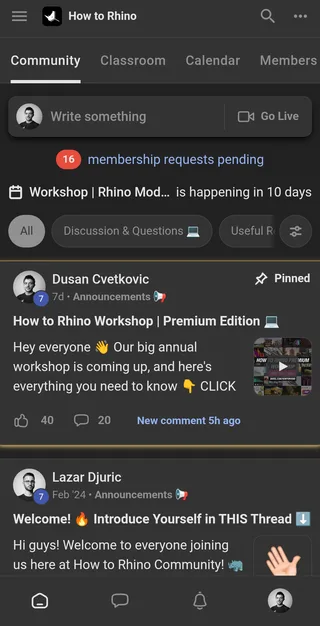
Skool has native iOS and Android apps. Members get push notifications for replies, mentions, and event reminders, and the app is fast enough that most of our members use it more than the web version. As a community owner, you can also moderate, post, and message from the app, which is useful when you are traveling or away from your computer.
Email Broadcasts to Your Members
This is one of the features that surprised us most when we joined Skool. You can send email broadcasts to every member of your community at once, directly from the platform, with no third party integration. The limit is one broadcast every 72 hours, which is plenty for a community newsletter and important announcements.
We use this to announce new courses, share weekly recaps, and remind members about upcoming events. Because the broadcast comes from your community email, deliverability is excellent and members are already used to seeing your name in their inbox. If you have ever paid $30 to $300 a month for a separate email tool, you already know how valuable this is.
Unlimited Video Hosting
Most course platforms require you to subscribe to Vimeo, Wistia, or another video host on top of their own fees. Skool includes unlimited HD video hosting at every plan level. Videos automatically generate captions, support timestamps, allow playback speed adjustments, and stream smoothly on both web and mobile. There are no monthly storage limits, no bandwidth caps, and no extra fees as your library grows.
How You Can Make Money on Skool
Skool gives community owners more monetization flexibility than almost any other community platform on the market. Here are the five primary models you can run inside your group, often combined within the same community.
1. Paid Subscription Memberships
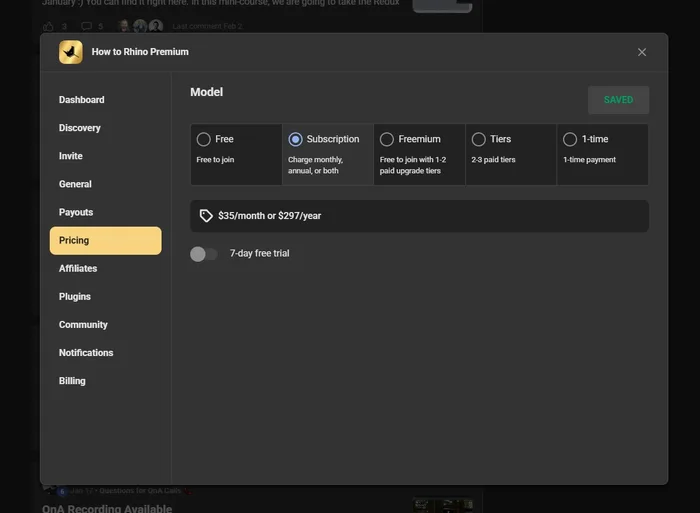
The classic Skool model. Members pay a recurring fee, monthly or yearly, to access your community and classroom. You set the price. Most communities charge between $20 and $99 per month or between $200 and $1,000 per year, depending on the depth of training and the level of access included.
Subscription memberships are powerful because they create predictable, compounding revenue. A community with 200 members at $35 per month is a $7,000 per month business with no extra inventory, no shipping, and no marketing channel that can disappear overnight. Skool processes the payments, handles renewals, manages failed cards, and gives you a single dashboard for everything.
2. One Time Course Purchases (Buy Now Courses)
New in 2026, Skool now lets you sell individual courses as one time purchases, separate from the main community subscription. This is a huge addition. You can offer a $97 specialty course on a specific topic without forcing the buyer to subscribe to the whole community. They get access to that one course for life, and you earn a clean one time payment.
Many community owners use this to run a freemium funnel. The community itself is free or low cost, and the higher priced individual courses are where most of the revenue comes from. It is a flexible model that lets you serve different audiences at different price points within the same Skool group.
3. Freemium Tiers
Skool now supports freemium tiers within the same group. You can offer a free tier with limited access, a paid tier with full access, and even multiple paid tiers above that. Members can self upgrade from free to paid right inside the platform, with no separate landing page or checkout flow needed.
This model is especially powerful for creators with a large free audience. You let people into the free tier to experience the community, then convert a percentage of them into paying members over time. The free tier becomes your top of funnel, and Skool handles every step from signup to paid conversion.
4. Multiple Pricing Levels
You are no longer limited to a single price. Skool now supports multiple pricing tiers in the same community, so you can offer a basic membership, a premium membership, and a top tier with personal coaching, all under the same roof. Each tier can include access to specific courses, specific events, or specific chat rooms, which lets you build a full ladder of products without ever leaving the platform.
5. Built In Payments and Low Transaction Fees
Skool processes all payments through Stripe. There are no separate merchant accounts to set up, no manual invoices, and no Zapier flows to maintain. Payouts go directly to your bank account on a regular schedule, and the dashboard tracks revenue, refunds, and active subscriptions in real time.
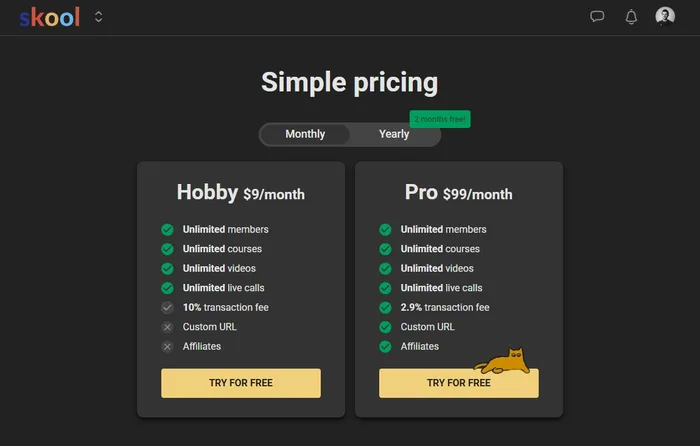
The transaction fees are very competitive. On the Pro plan, Skool charges only 2.9 percent on top of the standard Stripe processing fee, which is in line with what almost any payment processor charges anyway. On the Hobby plan, the fee is 10 percent, which is the main reason most serious community owners upgrade to Pro within their first or second month of running a paid group.
Combining Models: How We Run It at How to Rhino
The most powerful thing about Skool's monetization is that these models stack. You do not have to pick one. We are a good example of this, because we run two completely different revenue models on Skool at the same time.
Our free How to Rhino community is open to anyone. There is no monthly fee, no subscription, and no barrier to entry. People join, post their work, ask questions, and connect with other designers. The monetization comes from inside the community. Members can purchase individual courses as one time Buy Now products without ever having to subscribe. The community itself acts as the storefront, and our most engaged members convert into course buyers because they already trust us.
Our How to Rhino Premium community runs the opposite model. It is a paid membership at a fixed monthly fee, and members get full access to our entire classroom, weekly mini courses, and live workshops for as long as they stay subscribed. On top of that subscription, we can also offer individual course purchases inside the same group, for special workshops or guest expert content that sits outside the core membership. A member can pay their monthly fee and still choose to buy add on courses without leaving the community.
This flexibility is unique to Skool. You are not locked into a single revenue model. You can keep your community completely free and monetize through course sales alone, you can run a paid membership community, you can run both at the same time, or you can layer one on top of the other with the free community feeding paying customers into the premium one. Skool handles the payments, the access controls, and the member experience automatically. The result is that you get to design the business model that fits your audience, instead of forcing your audience into the business model the platform allows.
Skool's Built In Affiliate System
Skool's affiliate features work in two completely separate directions, and both can become real revenue streams.
Affiliates for Your Community
Inside every Skool group, you can turn members into affiliates. They get a unique referral link, and when someone signs up to your community using that link, the referring member earns a commission. You set the rate, the duration, and which members are eligible.
This is one of the most powerful growth levers on the platform. Your most engaged members usually have an audience of their own, and they want to recommend communities they love. Giving them a direct way to earn money for those recommendations turns word of mouth into a measurable channel.
Skool's Platform Affiliate Program
Separately, Skool runs its own platform affiliate program. When you refer someone to Skool itself and they create a paid community, you earn 40 percent of their subscription fee for life, as long as they stay on the platform. On the Pro plan, that is $39 per month per referral. On the Hobby plan, it is $3.60 per month per referral.
You earn this commission for every person who signs up through your link, every month, for as long as they stay subscribed. Refer ten Pro accounts and you earn $390 per month. Refer one hundred and you earn $3,900 per month, all on autopilot. The cookie window is 60 days and the attribution model is 14 day last touch, which is generous compared to almost any other affiliate program.
If you are reading this article and the platform sounds promising, the link below is our affiliate link. Using it costs you nothing extra, you still get the standard 14 day free trial, and we earn a small commission that helps us keep producing free guides like this one.
Start your 14 day free Skool trial
Skool Pricing in 2026: Hobby vs Pro
Skool's pricing is one of the simplest in the SaaS world. There are only two plans, and both include unlimited members, unlimited courses, and unlimited video hosting. The difference is the transaction fee and a handful of advanced features.
The Hobby Plan: $9 per Month
Hobby is the entry level plan, designed for creators who want to test the waters or run a small free community. It costs $9 per month, includes everything you need to run a community at a basic level, and charges a 10 percent transaction fee on any payments you collect. There is also a small group member cap on the Hobby plan, which makes it best for early stage or free communities rather than high revenue paid groups.
The Pro Plan: $99 per Month
Pro is where almost every serious community owner ends up. It costs $99 per month, includes unlimited members, drops the transaction fee to 2.9 percent, and unlocks the full set of features including custom domains, advanced analytics, and priority support.
When Pro Pays for Itself
The math on upgrading from Hobby to Pro is easy. The difference in monthly fee is $90 ($99 minus $9). The difference in transaction fee is 7.1 percent (10 percent minus 2.9 percent). At the point where 7.1 percent of your monthly revenue exceeds $90, Pro is cheaper than Hobby. That breakeven sits at around $1,270 per month. Once your community earns more than that, you are paying more on Hobby than on Pro. Most serious community owners cross that line in their first month or two.
Annual Billing
Skool offers two months free when you pay annually. That brings the effective Pro price to about $82.50 per month (paid as $990 once a year), which is the cheapest way to run a serious Skool community.
Free Trial
Every new account starts with a 14 day free trial on the Pro plan. You get the full feature set during the trial, which is more than enough time to set up your community, invite a small founding cohort, and validate that the platform is right for you.
Who Skool is Best For
Skool works for almost any creator with expertise and an audience, but a few groups consistently get more out of it than others.
- Coaches and consultants who want a recurring revenue stream beyond one to one sessions.
- Course creators who already sell digital products and want to bundle community with their offers.
- Skilled professionals, including architects, designers, engineers, developers, and other technical experts who want to teach their craft and build a community of peers.
- Educators and academic experts who want to monetize their teaching outside of traditional institutions.
- Influencers and creators who already have a free audience on YouTube, Instagram, TikTok, or LinkedIn and want a paid layer on top.
- Service providers who want to offer a community as a value add or upsell alongside their main service.
If you have any combination of expertise, an audience (even a small one), and a desire to build something that compounds over time, Skool gives you the foundation. The rest is content, consistency, and the relationships you build with your members.
How to Launch Your Skool Community in 30 Minutes
Setting up Skool is genuinely fast. We have helped friends and colleagues launch their first community in under half an hour. Here is the exact sequence we recommend.
Step 1: Start Your Free 14 Day Trial
Sign up at skool.com using our affiliate link. Pick a name for your group, choose a subdomain (this becomes yourname.skool.com), and confirm your email. The trial gives you full access to the Pro plan with no commitment.
Step 2: Brand Your Group
Upload a logo, set your cover image, and write a short description that tells visitors who the community is for and what they will get. Skool's onboarding makes this fast, and you can come back to refine it as you grow. The first impression matters because most paid communities sell themselves through a public preview page that uses these elements.
Step 3: Build Your First Course
Open the classroom and create your first course. You do not need a polished 60 hour curriculum on day one. Start with a flagship course of five to ten lessons that delivers a clear outcome. Record the videos with a basic setup, upload them directly to Skool, and write short text introductions for each module. You can always add more later.
Step 4: Set Your Pricing
Decide on your model. Are you running a paid subscription, a freemium tier, or selling individual courses? Set the price that reflects the value of your content and the financial reality of your audience. For most professional communities, $25 to $50 per month is a strong starting price. You can always raise it later as the community grows.
Step 5: Invite Founding Members
Bring in a small group of founding members, ideally 10 to 50 people, often at a discounted rate or for free. Their job is to populate the community with discussion, feedback, and momentum so that future members find an active group rather than an empty room. We did this for How to Rhino Premium and the founding cohort still has the highest engagement of any group inside the community.
Step 6: Launch Publicly
Announce the community to your existing audience. Email your list, post on your social channels, and tell anyone who has ever bought a product from you. Pin a welcome post in the feed that tells new members exactly what to do in their first week. Schedule a live kickoff event in the calendar for the first or second week to bring everyone together.
That is the entire setup. From signup to launch, you can compress this into a single afternoon if you have your content ready, or stretch it across a couple of weekends if you are still building.
Final Thoughts
Skool is the most focused, well designed community platform on the market in 2026. It replaces a stack of five or six tools with a single product, gives you every monetization model you would ever want, and gets out of your way so you can spend your time on members, content, and growth instead of integrations.
For us, choosing Skool was the moment our paid community went from a side project to a real business. We built How to Rhino Premium on it because we wanted predictable revenue, a single home for our members, and a platform that would still feel right two years later. That bet has paid off, and we have no plans to move.
If you have an audience, expertise, and a desire to build something that compounds, this is the easiest time in history to start. The 14 day free trial gives you everything you need to validate the idea, and the price of being wrong is essentially zero. The price of waiting another year, on the other hand, is twelve months of compounding revenue you will never get back.
Start your 14 day free Skool trial and build your community today
Related Resources
- Best Laptops for Architecture in 2026: The hardware behind every serious creative business.
- Rhino Mac vs Rhino Windows: A practical comparison for designers choosing their setup.
- Free 3D Models for Rhino: Eleven of the best libraries for sourcing assets.

Rhino for Architects Course
Give your architectural skillset a major boost with the Rhino for Architects Course. Get over 60 hours of focused training tailored specifically for architects. Master commands and techniques to model, render, and animate architectural visualizations at the highest level. Click below for more information and watch your designs come alive!