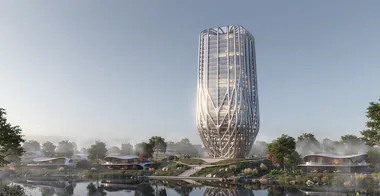
Zaha Hadid's Tower in Grasshopper
This mini course with Lazar Djuric builds a complex tower inspired by a project by Zaha Hadid Architects, step by step in Grasshopper. We start from one rounded rectangle, stack and scale it with combined Graph Mappers, work through multilevel data trees to draw the branching facade structure, and finish by turning the structure into one smooth mesh with Dendro, QuadRemesh and Weaverbird, rendered with RhinoFrame.

Complex buildings can look difficult at first, but they become much easier once you break them into smaller parts.
In this mini course, we will use a tower by Zaha Hadid Architects as our reference and create a similar design in Grasshopper. We will start simple and slowly build a large definition together, adding more parts as the project becomes more complex.
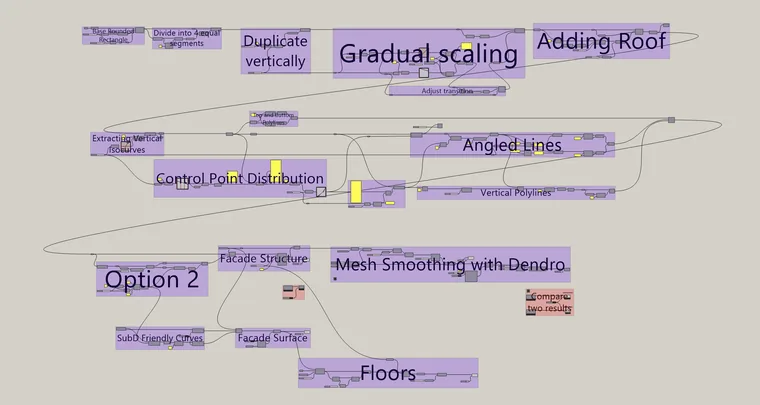
The goal is not just to make something that looks like Zaha Hadid's design. We want you to understand why each part of the definition is there, how everything connects, and how to think parametrically when working on bigger projects.
Large Grasshopper definitions can quickly become slow and computationally expensive, so we will also share a few practical ways to keep the file running smoothly. Along the way, we will use a bunch of Graph Mappers and features from Heteroptera and Flexibility, and on top of that you will learn a cool technique to smooth the mesh with Dendro, QuadRemesh and Weaverbird.

This mini course is best suited for people who already have some Grasshopper experience, but beginners are welcome as well. By the end, you should feel more confident working with large and complex definitions, while also picking up new ideas and techniques along the way.
- How to start a tower from one rounded rectangle with a centred origin and a fillet that scales with it, then split it into four identical faces with Explode, Match Text and Shatter
- When to stack levels with Range instead of Series, and why you graft the data to move 46 levels in one step
- How to combine two linear Graph Mappers into one scale-up, scale-down profile and choose the level where the tower is widest
- How to space the facade isocurves symmetrically with the Bipolarity Graph Mapper from Heteroptera
- How to build mirrored point distributions and read multilevel data trees (face, curve, point) with Longest List, Combine and Param Viewer
- How to draw the angled facade lines with Relative Item and a dynamic Split Tree mask written with the Format component, so the pattern mirrors itself on every face
- How to turn the polylines into a structure with MultiPipe, build the glass skin from SubD-friendly curves (Flexibility) and contour the floor slabs
- How to compare design options with Stream Filter and Stream Gate, and switch previews and whole groups on and off with MetaHopper
- How to turn the structure into one smooth mesh with Dendro, QuadRemesh and Weaverbird, and keep a heavy definition fast with Data Dam or a group toggle
- How to render the finished tower with RhinoFrame
Lazar Djuric
Co-founder of How to Rhino with deep expertise in Grasshopper, computational design, and parametric facade systems. Lazar leads the Grasshopper-heavy work in the How to Rhino curriculum and teaches plugin-driven workflows to a community of 90,200+ YouTube subscribers.