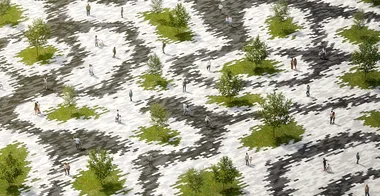
Parametric Landscape with Grasshopper
Design a complete parametric landscape from scratch in Grasshopper, including a three-color fluid tile pattern, staggered panel layout, dissolving color transitions, 3D extruded pavement, and a photorealistic V-Ray 7 render with trees and people.

Instructor Lazar Djuric walks through a multi-part project that shows how Grasshopper alone can control not just geometry but full material assignments, layer baking, and rendering setup. The foundation of the design is a curved surface generated with Perlin noise (from the 4D Noise plugin), which is sliced into contours and used to split a flat plane into organic tile shapes.
The second and third parts cover placing staggered quad panels using LunchBox tiling, separating panels by their parent zone using point-on-surface proximity testing, applying five shades of grey via gradient components, and baking everything to named sublayers with Rhino 8's Grasshopper model components. The final part covers creating V-Ray materials, applying a grass texture, importing Chaos Cosmos trees and people, and setting up a sun-lit render.
- How to generate organic curved surfaces using Perlin noise (4D Noise plugin) with time and scale sliders
- How to split surfaces with extracted contours to create irregular tile patterns
- How to color tile zones using B-Rep topology adjacency to identify neighboring faces
- How to create a smooth dissolving color transition between zones using closest-point cloud search
- How to use LunchBox staggered quad panel components and clip them to a boundary curve
- How to apply 5-shade color gradients with shuffle randomization for visual variety
- How to bake to named sublayers using Rhino 8's Model Object, Model Layer, and Content Cache components
- How to extrude pavement meshes to 3D, create V-Ray materials, and set up a V-Ray sun light render