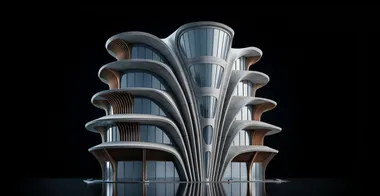
Manta Hotel | Designed by Vincent Callebaut
Model the Manta Hotel in Rhino entirely from scratch using a clean SubD workflow for complex organic architecture, then detail facade ribs, patterned surfaces, and mullions with manual and Grasshopper-assisted methods.

The course begins with an overview of Vincent Callebaut's portfolio and then jumps straight into modeling the Manta Hotel's front facade from a set of perspective reference images. Because this is a conceptual project with limited documentation, Dusan walks you through how to read the available views, set a centerline despite lens distortion, and use the Reflect command so you only need to model one half of the building while the opposite side updates automatically.
From there, the bulk of the course is hands-on SubD modeling. You start by laying out each wing as a separate SubD in 2D, planning the topology so that edge counts will line up when it is time to fuse everything together. Then you pull the geometry into 3D using point and edge manipulation, stitch and bridge the individual pieces into a single closed SubD, and build out floor plates, terraces, and the rooftop skylight opening. The final section covers facade detailing: creating mullions with Duplicate Edge, Divide, Offset Curve on Surface, and PushPull, distributing panel patterns with Grasshopper, and using FlowAlongSrf to apply decorative elements onto curved surfaces.
- How to import perspective reference images, establish a usable centerline despite lens distortion, and plan your SubD surface divisions before you start modeling
- How to use the Reflect command to set up a symmetrical SubD workflow so every change on one side is automatically mirrored to the other
- How to build each wing of the hotel as a separate SubD, lay it out in 2D first, and then pull the geometry into 3D with point-level and edge-level adjustments
- How to control organic curvature with Insert Edge, Slide, creases, and Set Point while keeping the topology clean enough to fuse neighboring surfaces later
- How to join multiple SubD pieces into one closed shape using Stitch, Bridge, and Fill, and how to troubleshoot common edge-matching problems
- How to build floor plates, terrace elements, and the rooftop skylight opening by extruding, bridging, and creasing edges within the fused SubD
- How to convert SubD to NURBS and create window mullions using Duplicate Edge, Divide, Offset Curve on Surface, Trim, and PushPull, then mirror them across floors
- How to use Grasshopper to cut surfaces, sort intersection curves, and extrude facade panels, and how to apply decorative patterns with FlowAlongSrf onto curved geometry