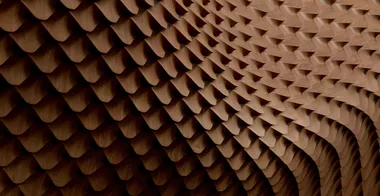
Complex Parametric Wall
Learn how to build a complex parametric wall pattern inspired by Simon Vorhammer's real-world project, step by step in Grasshopper. This session covers the full logic behind the script, from generating a custom diagonal grid on a freeform surface to sculpting the final mesh with attractor curves.

Instructor Lazar Djuric walks you through a live community session where a student posted this very pattern asking how to model it. Rather than guessing, Lazar builds the entire definition from scratch and explains every decision along the way. The base surface is created in Rhino, rebuilt with custom UV point counts, and referenced back into Grasshopper so the pattern always adapts to the geometry.
The session covers two main areas: parametric thinking and data tree control. You learn to construct a diagonal grid without any plugin by combining the Relative Item component with custom split masks, then build tangent curves whose control points are pushed along the surface normal using a dual-attractor system. In the final steps the mesh is refined through chamfering of polyline corners and doubling of key edges, giving the result sharper ridges and a more hexagonal silhouette.
- How to build and rebuild a custom base surface in Rhino with controlled UV direction, then reference it into Grasshopper
- How to construct a diagonal grid from scratch using the Relative Item component with custom branch and index offsets, without any dedicated grid plugin
- How to use Split Tree with bracket notation to apply different rules to even and odd branches and indices
- How to build tangent curves whose mid-control points are displaced along the surface normal using a Remap and ClipT attractor workflow
- How to set up a dual-attractor system (attractor curve plus boundary curve) to control the amplitude of surface displacement
- How to weave horizontal and diagonal curve sets together for a loft-ready sequence
- How to use the Roman Doris Mesh Loft component for fast mesh creation from dense polyline sequences
- How to apply Weaverbird smoothing to the final mesh and control sharpness through edge-doubling