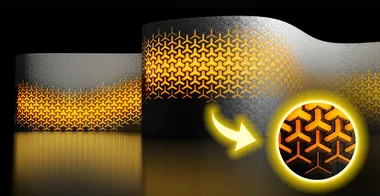
Parametric Y-shaped Panels Facade
Build a fully parametric Y-shaped facade panel system in Grasshopper, inspired by UNStudio's Chicago Museum of Film, and apply it to any periodic surface. The course covers hexagonal grid generation, custom polygon welding, attractor-driven panel openings, and data tree organization at scale.

Instructor Lazar Djuric starts by explaining why a periodic base surface is required: the standard Lunchbox Hex Divide component does not handle the seam line of a periodic surface, so the course uses the N-Gon plugin's Hex Divide component instead. The base surface is built from a rounded polygon rather than a cylinder, giving full control over the number of sides and the facade proportions.
The script is built in clearly named groups: base polygon, surface, hexagonal grid, unification of corner point order, Y-shape panel construction, point-group welding, bottom-edge panels, top-edge panels, and attractor curve system. The welding step uses the Point Group component to find clusters of coincident vertices across 56,000 points, then averaging and replacing them. The attractor system uses Remap with a clipped source domain so that a controllable band of panels near the attractor stays fully open while the rest close progressively.
- How to build a periodic base surface from a parameterized polygon, fillet the corners, and extrude it as a ruled surface
- How to use the N-Gon plugin's Hex Divide component to apply a seamless hexagonal grid to a periodic surface
- How to create a cluster of Grasshopper components with named Cluster Input and Output nodes for reusable corner-sorting logic
- How to derive Y-shaped panel curves from hexagon midpoints by alternating scale factors and interlacing with the Weave component
- How to keep boundary panel edges flat using pull-to-curve distance thresholds and Pick and Choose logic
- How to weld 56,000 polygon vertices using the Point Group component with a distance threshold derived from average segment length
- How to use the Flexibility plugin's Attractor Curve component with Remap and ClipT to produce a gradient of panel openings
- How to use the Data Dam component to pause heavy recalculations during parameter exploration