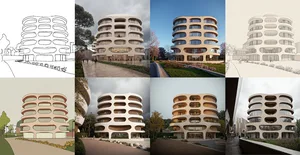
ComfyUI for Architects vol.2
A hands-on workshop that introduces architects to the exciting world of generative AI tools. Perfect for beginners, and an update for experienced users. This session provides a practical foundation in using powerful AI tools like Stable Diffusion, Flux and ComfyUI to enhance your architectural design workflow.

A hands-on workshop that introduces architects to the exciting world of generative AI tools. Perfect for beginners, and an update for experienced users. This session provides a practical foundation in using powerful AI tools like Stable Diffusion, Flux and ComfyUI to enhance your architectural design workflow. You'll learn key generative AI concepts for architecture, get hands-on use of Stable Diffusion, ComfyUI, and the new Flux model, and leverage ChatGPT for practical image generation tasks.
You'll leave with ready-to-use ComfyUI templates including Flux and ControlNet workflows, a solid understanding of Stable Diffusion, Flux, and ChatGPT in architecture, and the confidence to start implementing AI in your practice. No prior AI experience is needed. We'll guide you through every step of the process.
- Understand how the Flux model differs from Stable Diffusion XL and configure it in ComfyUI with the guidance node
- Build text-to-image workflows from scratch using checkpoint loaders, CLIP encoders, KSampler, and VAE decoder nodes
- Write effective architectural prompts using a structured formula for medium, subject, style, and mood
- Use ControlNet with Canny edge detection and depth maps to render hand sketches and Rhino screenshots
- Apply IP Adapter to transfer visual style, materials, and design language from reference images onto generated outputs
- Create and use LoRA models to customize and fine-tune generation results for specific architectural styles
- Set up inpainting workflows to edit specific areas of generated images using masks and site photo composites
- Upscale AI-generated images to higher resolution for presentation-quality architectural visualizations
Session 1: Flux Fundamentals and Text-to-Image Workflows
- Introduction to the Flux model and how it differs from Stable Diffusion for architectural use
- Setting up ComfyUI with checkpoints, the Flux guidance node, and essential extensions
- Building text-to-image workflows with KSampler, CLIP encoders, and VAE decoder nodes
- Writing architectural prompts using structured formulas for subject, style, and mood
- Understanding checkpoint models, LoRAs, and how to combine them for better results
- Image upscaling techniques to enhance resolution of generated architectural renders
Session 2: ControlNet, Inpainting, and Advanced Workflows
- Using LoRA models to customize generation for specific architectural styles and aesthetics
- ControlNet workflows with Canny edges, depth maps, and normal maps for geometry-accurate rendering
- Rendering hand sketches and Rhino viewport screenshots into photorealistic architectural visualizations
- Inpainting workflow: editing specific areas of images using masks and site photo composites
- Combining ControlNet and inpainting in a single workflow for contextual site design
- Live screen share node for real-time Rhino-to-ComfyUI rendering connection
Ömer Nuray
Ömer Nuray is an architect, content creator, and founder of Design Input Studio. Through his studio, he creates content aimed at integrating new technologies such as AI into architecture and the design process. His interest in computational design and automation led him to the world of Artificial Intelligence.
As an AI Architect at Rendair AI, he is involved in developing an AI-powered architecture visualization solution. Ömer shares his expertise and journey through his online presence, reaching and inspiring architects and designers worldwide. He provides guidance on integrating AI into the design process through platforms such as his YouTube channel, social media and Design Input Academy.