D5 Render Bootcamp: Real-time Visualization for Architects
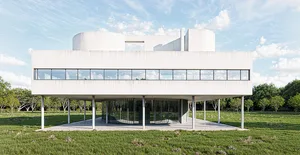
We'll explore how to use D5 Render to create high-quality, real-time visualizations from scratch. The workshop includes rendering the iconic Villa Savoye, demonstrating how to complete an architectural project efficiently.

We'll explore how to use D5 Render to create high-quality, real-time visualizations from scratch. The workshop includes rendering the iconic Villa Savoye, and demonstrating how to complete an architectural project efficiently. Students will dive into the core aspects of D5 Render, such as applying materials, setting up lighting, leveraging AI-powered tools like AI Atmosphere Match and Material Generating to speed up visualization workflows, and creating quick animations to bring designs to life and complement renderings.
By the end of the workshop, students will have the skills to produce photorealistic renders, streamline their rendering process, and confidently present their work. Whether you're a beginner or looking to elevate your skills, this workshop covers all the essential techniques for real-time visualization in architecture. No prior knowledge is required.
- Set up a Rhino-to-D5 pipeline using the correct import method for your workflow, whether direct import, Live Sync, or D5A export for animation
- Apply and fine-tune PBR materials using Triplanar mapping, UV randomization, and AI-generated texture maps without leaving D5
- Populate a site with vegetation using scatter, brush painting, and path arrays, controlling density, probability, and size variation
- Configure exterior lighting with dynamic sun and HDRI environments, and use AI Atmosphere Match to replicate a reference image's look
- Sculpt and texture terrain from scratch using brush tools and pre-built height map resources, then tie scatter zones to painted terrain regions
- Set up architectural camera shots with two-point perspective, depth of field, and composition framing techniques
- Render single images and batch queues, apply AI enhancement and style transfer in post, and export render channels for Photoshop compositing
- Create animated fly-throughs and phasing diagrams using the D5A export workflow, with dynamic people and vehicle paths
- Organize multi-option projects using D5's layer and scene system to toggle geometry, materials, and lighting with a single click
- Apply a fast Photoshop post-processing pass using Camera Raw filter presets and manual light layers to polish final deliverables
Session 1: D5 Render Fundamentals, Materials, and Environment Setup
- Import methods compared: direct import, Live Sync plugin, and D5A export workflows
- D5 interface orientation: scene library, layer manager, environment panel, and navigation controls
- PBR material workflow: base color, normal, roughness, specular, and metallic channels with Triplanar mapping
- D5 asset library: preset materials, local and team cloud library, AI texture upscaling
- Vegetation placement: scatter tool, brush painting, path-based arrays, and material template grass
- Lighting basics: dynamic sun and sky, HDRI, point lights, spotlights with IES profiles, and rectangular lights
- Scenes and environment presets: AI Atmosphere Match, layer toggling for design options
- Performance considerations: VRAM limits, FPS booster, organizing large multi-file projects
Session 2: Terrain, Cameras, Rendering, Animation, and Post-Processing
- Terrain sculpting tools: raise, lower, smooth, plateau brushes, biome presets, layer-based texture painting
- Decals, grunge, and parallax interior planes for faking furnished rooms behind glass
- Section and diagram tools: section plane, section cube for cutaway views, built-in poche coloring
- Camera setup: two-point perspective, focal length, depth of field, aspect ratio overrides
- Rendering workflow: single render, batch queue, render channels, AI Super Resolution upscaling
- AI post-processing: AI Enhancer, AI Style Transfer for seasonal variations and sketch effects
- Animation and phasing: D5A export, pop-in templates, character and vehicle path tools
- Photoshop post-processing: Camera Raw filter, preset-based editing, manual light painting
Andy Christoforou
Andy leads the Visualization and AI efforts at Kohn Pedersen Fox (KPF), where he integrates cutting-edge technology into architectural design workflows. A licensed architect and professor, Andy has over 15 years of experience in 3D visualization, focusing on real-time rendering engines like D5 Render.
He has taught over 10,000 students throughout his career and presented on rendering techniques at Autodesk University and Nvidia's GTC conference. His expertise focuses on teaching the latest workflows, helping students get started quickly with what they need to know to achieve great results fast.