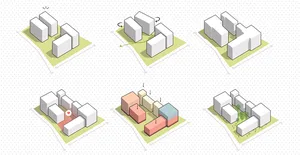
Massing Diagrams in Architecture
This workshop provides an in-depth, step-by-step approach to creating professional and visually compelling massing diagrams using Adobe Illustrator. Participants will learn how to seamlessly import models from SketchUp/Rhino 3D, clean and edit 3D linework, and add layers of visual information.

This workshop provides an in-depth, step-by-step approach to creating professional and visually compelling massing diagrams using Adobe Illustrator. Participants will learn how to seamlessly import models from SketchUp/Rhino 3D, clean and edit 3D linework, and add layers of visual information in 3D text and shadows. The session is tailored for architecture students and professionals aiming to elevate their presentation graphics with clean, detailed, and communicative diagrams.
You will work through a complete diagram creation workflow, from exporting your 3D model all the way to a polished, presentation-ready architectural diagram with annotations, entourage, and shadow overlays. No prior Illustrator experience is required.
- How to export vector PDFs from SketchUp (with fills) and DWG/AI files from Rhino (via Make 2D), and the trade-offs of each approach
- How to set up an accurate artboard in Illustrator matched to the Rhino viewport dimensions so multiple diagram steps align without manual rescaling
- How to use the Shape Builder tool and Pathfinder Unite to apply fills and generate outlines from complex or curved geometry
- How to apply three-tone color shading (top face, left face, right face) to make a flat 2D vector read as a three-dimensional volume
- How to create isometric-aligned arrows and rotated text labels using Illustrator's 3D Classic Rotate effect
- How to build a clean layer structure in Illustrator: base, outlines, arrows, cores, sun path, trees, and human figures in isolated, named layers
- How to create site analysis annotations including sun path arcs, wind movement arrows, projection lines, and gradient overlays
- How to overlay shadow PNGs onto the vector diagram using the Multiply blending mode for convincing depth
Session 1: Massing Diagrams with Illustrator: From 3D Model to Presentation
- Purpose and use cases of 3D massing diagrams in architecture
- 3D model setup in SketchUp: parallel projection, isometric views, shadow export workflow
- 3D model setup in Rhino: Make 2D command, viewport rectangle, layer management, exporting as DWG or AI
- Illustrator workspace setup: Essentials Classic layout, layer organization, artboard management
- Filling surfaces with color using Shape Builder tool, with three-tone shading for depth
- Creating diagram annotations: Pen tool for outlines and arrows, dashed lines, 3D Rotate effect for isometric text
- Site analysis annotations: curvature tool for sun path and wind lines, gradient overlays, transparency and blending modes
- Adding entourage: scaling isometric tree vectors and human figures, shadow PNG overlays with Multiply blending
- Clipping masks for cropping diagrams to defined boundaries
- Final export and presentation tips
Vishakha Tiwari
Vishakha Tiwari is the founder of Architecture Candy, an Instagram platform dedicated to helping architects and students master visual communication. With a thriving audience of over 187K followers, she empowers designers to create stunning architectural graphics using tools like Photoshop and Illustrator.
Through detailed courses, Vishakha teaches essential skills for crafting compelling portfolios and presentations, bridging the gap between design ideas and impactful visuals. Her mission is to make high-quality architectural representation accessible to everyone, fostering creativity and confidence in the design community.