Rhino 9 New Features for Architects
This mini course with Dusan Cvetkovic walks you through the Rhino 9 features that matter for architects, each one shown on an architectural example. We set up the new workspace, take a site and a massing from survey to walls with Overlap, Polyline Offset and multi-face PushPull, pattern a curved facade with the rebuilt ArrayCrv and ScaleEach, and try the new curve, surface and SubD tools. Then we turn the model into drawings and sheets with clipping drawings projected in place, 58 default hatch patterns and layout groups, present it in the Concept display mode, and finish with RhinoAI.

Rhino 9 is available now, and there is a lot in it. McNeel announced well over a hundred new and improved features, from a new interface to RhinoAI. You don't need all of them, so we went through the full list and picked the ones that actually change the way architects and designers work.
In this mini course, we go through those features one by one, each on an architectural example. We start with the new workspace, which now uses one layout on Windows and Mac, and show you how to bring your Rhino 8 setup across. Then we look at what changed under the hood, from the new Direct3D display on Windows to the speed work on large files and a new way to see what makes a file heavy.
Next comes modeling. We clean up a site survey's linework with Overlap, draw walls in one stroke and thicken all of them at once now that PushPull works across several faces. We pattern a curved facade with the rebuilt ArrayCrv and ScaleEach, try the new Rebuild algorithm, the rewritten Patch, the FilletSrf upgrades and the new SoftTransform panel, and shape organic forms with InflateCrv, Knife and MatchSubD.
After that, we move on to drawings and presentation. Clipping drawings can now be projected in place, there are 58 default hatch patterns and a new command to draw your own, linetypes can carry shapes and text, and layouts can be grouped and printed as a set. We also furnish a plan from the new drafting symbols library, redline a view with Markup, and present the model in the new Concept display mode.
We finish with the biggest addition, RhinoAI, McNeel's own AI plug-in. It connects your Claude or Codex subscription to Rhino and Grasshopper. In the longest lesson of the course we use it to model the Redux House from reference images, turn it into drawings and renders, and build a parametric canopy in Grasshopper, all from prompts.
This mini course is best suited for people who already use Rhino 7 or 8 and want to know what is worth learning in Rhino 9. Wherever a tool already existed in Rhino 8, we show you exactly what changed.
To follow along you need Rhino 9 on Windows 11 or on an Apple Silicon Mac with macOS 26 or 27, as McNeel's system requirements list. The free 90-day evaluation is enough. RhinoAI is free and installed by default, but it needs a paid Claude, Codex or Gemini account or a capable local model.
Want the overview first? Read our guides to Rhino 9 for architects and RhinoAI for architects.
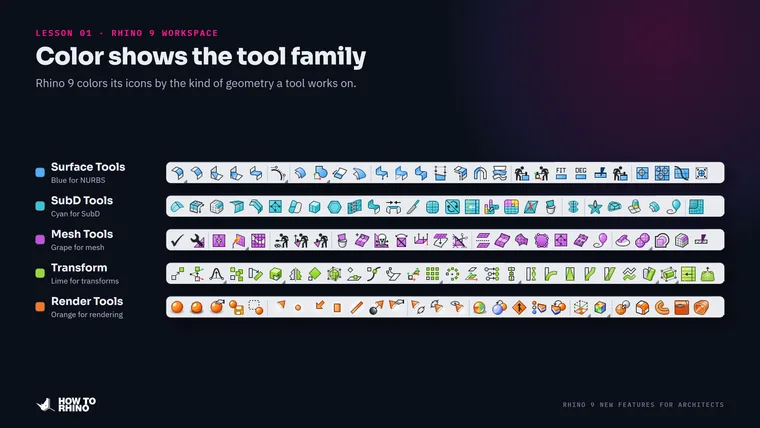
- How the new interface works now that Windows and Mac share one layout, what the color-coded icons mean, and how to bring your whole Rhino 8 setup across with OptionsMigrate
- How to make any alias instant so it runs without pressing Enter, and how to build your own toolbar in the rebuilt toolbar editor
- What the Direct3D display on Windows, the display optimizations and the crisp shadows in large models change, and how to find what makes a file heavy with the new Audit3dmFile tree map
- How to clean duplicate survey linework with Overlap and draw walls in one stroke with the new Polyline Offset option
- How to thicken every wall at once now that PushPull works across several faces
- How to pattern a curved facade with the rebuilt, interactive ArrayCrv and grow openings toward an attractor with ScaleEach
- How the new Rebuild algorithm, the rewritten Patch, the FilletSrf upgrades and the new SoftTransform panel give you cleaner curves and surfaces with less work
- How to inflate a roof from curves with InflateCrv, cut SubD faces along a line with Knife, and match a SubD edge to a curve with MatchSubD
- How to project clipping drawings in place, use the 58 default hatch patterns and the new hatch panel, draw your own pattern with HatchPattern, and add shapes and text to linetypes
- How to organize sheets with layout groups, furnish a plan from the drafting symbols library and redline a view with Markup
- How to present straight from the viewport with the Concept display mode, and how the new Product render preset lets sunlight pour through a section cut
- How to set up RhinoAI with your Claude or Codex subscription, model the Redux House from reference images, and turn it into drawings and renders with RhinoFrame
- How to let RhinoAI build a parametric canopy in Grasshopper from a concept board and a prompt
Dusan Cvetkovic
Founder of How to Rhino and the lead behind RhinoFrame. Dusan has spent more than a decade teaching Rhino and Grasshopper to architects and building tools that bring computational design and AI into everyday architectural workflows, reaching a community of 90,400+ YouTube subscribers.