Most new Rhino versions bring long feature lists that were not written with architects in mind. Rhino 9 is different. A large part of what McNeel has shown is about drawings, layouts and presentation, which is exactly where architects have struggled in Rhino for years.
I teach Rhino to architects, so I went through McNeel's announcements and feature posts for the beta and picked out what matters for architectural work. Below you will find who can use the beta, the features worth your time, what is still unknown, and whether you should switch now.
Key Takeaways
- The Rhino 9 beta is open to every licensed Rhino 8 user. McNeel calls it feature-complete and releases new builds every week.
- Drafting is the big story. Document section styles, 58 new hatch patterns, non-rectangular details, layout groups, markups and drafting symbols all target drawing production.
- Windows and Mac share one interface, and the new Concept display mode gives massing models a clean presentation look.
- Grasshopper 2 and RhinoAI come bundled, but both are still in development.
- Keep production work in Rhino 8. There is no release date or upgrade price yet, and McNeel says the weekly builds are often not production-ready.
What the Rhino 9 Beta Is and Who Can Use It
McNeel opened the beta on June 23, 2026 with the forum post Help shape Rhino 9. The BETA is here! It is available to all licensed Rhino 8 users, and the feature list specifies a Rhino 8 commercial or educational license key. McNeel describes it as feature-complete. The team is no longer adding features or making big interface changes, only fixing bugs, documenting, localizing and helping plugin developers.
- Download it from the Rhino Beta download page. It installs next to Rhino 8, which McNeel asks you to keep.
- Run OptionsMigrate to bring over your settings, toolbars and plugins from Rhino 6, 7 or 8.
- Work on copies. The beta writes a new file format, so save back in the Rhino 8 format whenever a file returns to production.
McNeel also warns that the weekly builds are often not stable or production-ready. Existing Grasshopper definitions should work, and problems go to Serengeti, the forum category for beta feedback.
Rhino 8 vs Rhino 9 for Architects at a Glance
| Area | Rhino 8 | Rhino 9 beta |
|---|---|---|
| Interface | Different layouts on Windows and Mac | One interface on both, classic layouts optional |
| Presentation display | Custom display settings or another app | New Concept display mode |
| Section styles | Set per object, layer or clipping plane | Named document styles shared across the file |
| Clipping drawings | Clipping sections | Reflected ceiling plans and stacked floor plans |
| Hatches | 9 default patterns, custom ones by editing .pat files | 58 new patterns and a HatchPattern command |
| Details | Rectangular | Any closed curve, also in DWG |
| Layouts | Sorted by naming conventions | Layout groups |
| Design review | Screenshots and an image editor | Markups saved with the view |
| Drafting symbols | Your own block library | Built-in library (Windows only for now) |
| Grasshopper | Grasshopper 1 | Grasshopper 1 plus the Grasshopper 2 beta |
| RhinoAI | Install from the Package Manager | Included by default |
| Windows | Windows 10 or 11, Intel or AMD | Windows 11 only, Intel, AMD or ARM |
| Mac | Intel or Apple Silicon, macOS 12.4 or later | Apple Silicon only, macOS 26 or 27 |
One Interface on Windows and Mac
The new user interface, presented on July 15, 2026, uses the same layout, panels and tools on Windows and macOS. The command line combines the horizontal Windows layout with the buttons and drop-downs from the Mac. Toolbars get a new color palette, and the Rendering and Layouts panels are on by default.
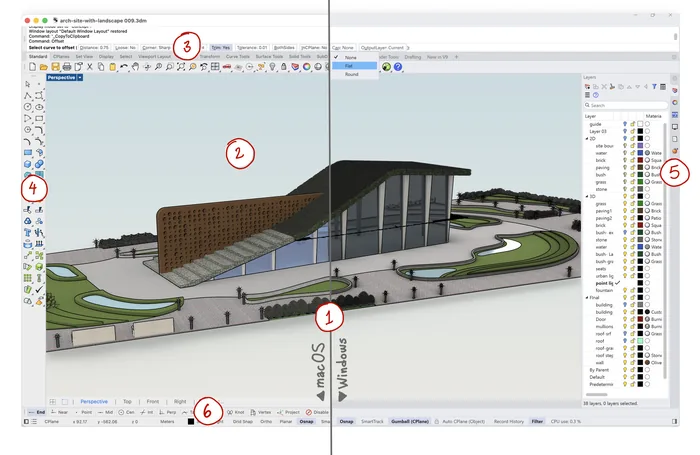
The same Rhino 9 beta interface on macOS (left) and Windows (right). Screenshot: McNeel, Rhino forum
McNeel names teaching in mixed labs as one reason for the change, and that is where I see the biggest benefit. Architecture students and offices rarely use one platform, and now a tutorial recorded on Windows looks the same on a MacBook. Classic Windows and Mac layouts are still under Window > Window Layouts. For the differences that remain in Rhino 8, see Rhino Mac vs Rhino Windows.
Concept Display Mode for Massing and Early Design
Concept is a new built-in display mode tailored for architects and designers. It combines a light blue to light brown gradient background, soft shadows, emphasized silhouettes and a grid that fades at the edges, while materials still render with reflections and refraction.
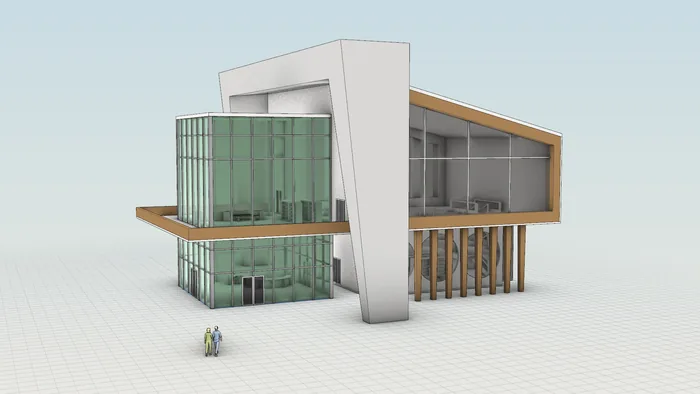
A library model in the new Concept display mode. Screenshot: McNeel, Rhino forum
McNeel suggests it for massing studies, schematic design presentations and competition or academic work. You can apply it to details on a layout and adjust silhouette width and grid under Options > View > Display Modes > Concept. For students, it removes one of the most frustrating early tasks, which is making a model look presentable without exporting it.
Drafting and Documentation Improvements
If you produce plans, sections and elevations in Rhino, this is the part of Rhino 9 that will change your workflow.
Document section styles
Rhino 8 introduced clipping sections, but each section style (fill, hatch, edge color and line weight) had to be set on every object, layer or clipping plane. With document section styles, you define named styles such as concrete or wood framing once and assign them anywhere. Edit the style and every cut that uses it updates.
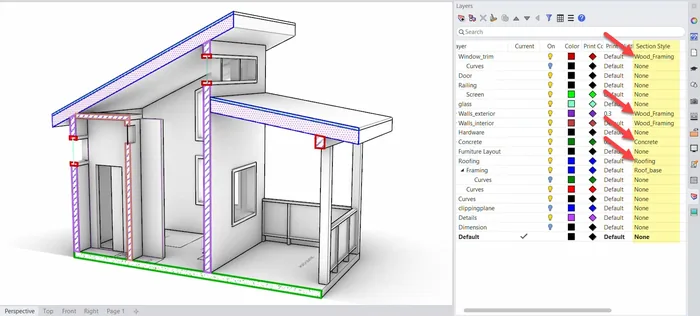
Named section styles assigned per layer in the Rhino 9 beta. Screenshot: McNeel, Rhino forum
Saved back to Rhino 8, the styles are assigned to the individual objects, layers or clipping planes, so the drawings keep their look.
Reflected ceiling plans and stacked plans
The clipping drawings enhancements project sections and elevations in place on the clipping plane and can place drawings at an elevation, which lets you stack the floor plans of a building. The ClippingDrawings command can also create reflected ceiling plans with its Reflected projection option.
Hatches that work for architecture
Earlier versions shipped with nine basic hatch patterns. The beta adds 58 new default patterns, including concrete, rubble and stone, and the HatchPattern command turns curves you draw into a custom pattern without editing .pat files. The new hatch panels show visual previews and separate layout-scaled patterns from model-scaled ones.
Non-rectangular details and layout groups
Details can now use any closed curve as their boundary, through the new SetDetailBorder command or the FromCurve option of Detail. A circular enlarged detail is now a native layout element, and McNeel says DWG import and export support it.
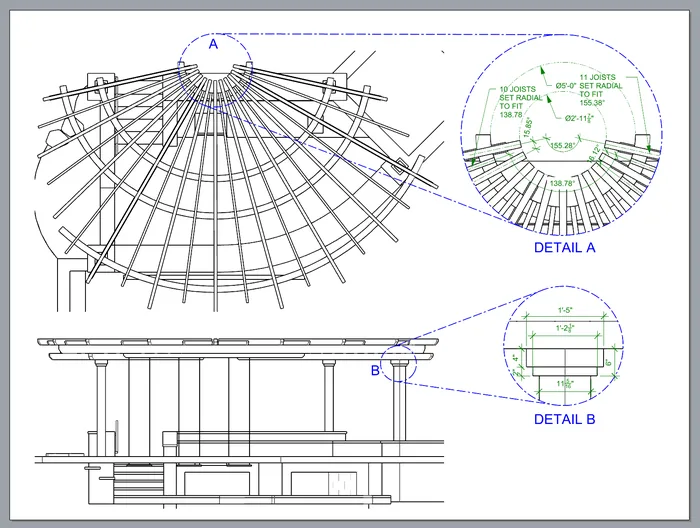
Circular details on a Rhino 9 beta layout. Model: Craig Maupin and Rhadiante Van de Voorde, Elemental Design Studio. Screenshot: McNeel, Rhino forum
Layout groups organize sheets by status, discipline or floor, and a whole group can be printed or exported at once. McNeel notes that 50 to 60 layouts in one model is not unusual. Layout groups are lost when you save back to Rhino 8.
Markups for design review
With Markup, you draw, add callouts and write notes directly on a view, and the markup is stored in the model with a screenshot of that view. You can export it as images or a multi-page PDF, so client and team comments stay inside the file.
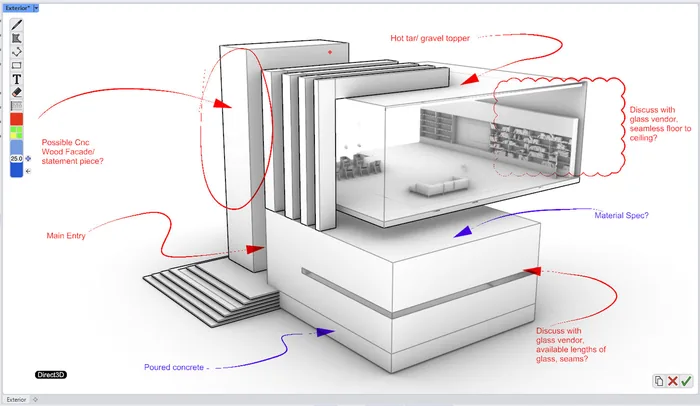
A design review markup drawn on the view in the Rhino 9 beta. Screenshot: McNeel, Rhino forum
Drafting symbols
A new drafting symbols library provides 2D blocks such as doors, windows, title blocks and detail titles, dragged in from the Library panel. McNeel's post says it is in the Windows beta only for now, with the Mac version in progress.
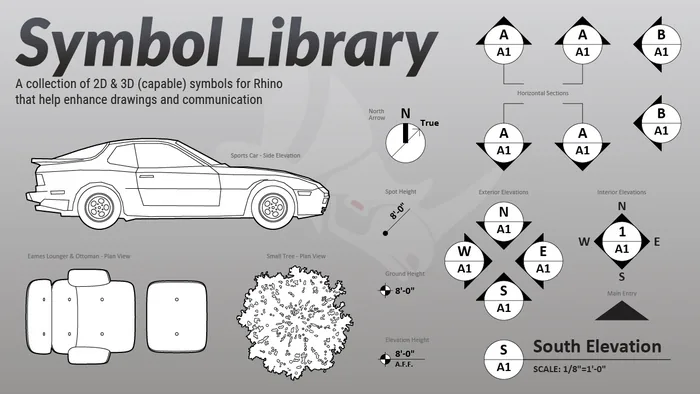
Examples from the drafting symbols library. Image: McNeel, Rhino forum
DWG and Navisworks exchange
The DWG improvements keep display colors and layer descriptions, and save placed images to a subfolder that AutoCAD can load as external references. Rhino 9 also exports to Navisworks, and the Overlap command cleans duplicate linework from imported DWG and PDF drawings. New to drawings in Rhino? Start with our tutorial on creating 2D drawings.
Modeling Changes Relevant to Architecture
- Booleans. They now continue through failures instead of stopping, run in parallel and split non-manifold results into separate pieces. That helps when you cut many openings into a facade at once.
- SubD. Display is smoother for creased and large SubDs, and the Knife command adds topology by drawing cuts. Our SubD speed modeling tutorial covers the basics.
- GlobalEdgeContinuity. It checks G0, G1 and G2 continuity across many surfaces at once, useful for freeform facades.
- Section renders. The Architecture render preset keeps clipped walls blocking light, so a sectioned building is lit as if it were closed.
Grasshopper 2 and RhinoAI Come Bundled
Grasshopper 2 ships inside the beta and opens with the GH2 command. McNeel's Grasshopper 2 post calls it a ground-up rewrite with a new solver, data model and interface. Grasshopper 1 stays installed, Grasshopper 1 plugins do not load in GH2, and McNeel says production work should stay in Grasshopper 1 for now. A McNeel developer confirmed that GH2 will release with Rhino 9. We will cover it in a separate article.
McNeel announced RhinoAI on September 30, 2026, and it is included by default in the beta. It connects Rhino and Grasshopper to AI assistants such as Claude, GitHub Copilot, Codex, Gemini and local models, and Rhino 8 users can install it from the Package Manager.
System Requirements and Platform Changes
McNeel's Rhino 9 system requirements, marked as subject to change, list the following:
- Windows. Windows 11 only, with Intel, AMD or ARM processors. Windows 10 is not supported.
- Mac. Apple Silicon only, on macOS 26 (Tahoe) or macOS 27. Intel Macs and macOS 15 or older are not supported.
McNeel signaled the Intel change early, when a developer wrote in July 2025 that a RhinoWIP build may be the last to support Intel Macs. The Rhino 8 requirements still include Intel Macs and Windows 10, so nothing breaks today. If you are buying a laptop, check our guide to the best laptops for architecture.
What We Still Do Not Know
The release date. McNeel has not announced one. The beta post says user reports help decide when Rhino 9 ships, and in May 2026 a McNeel developer wrote that it would not release until much later this year.
The upgrade price. No Rhino 9 pricing is published. In the same thread, the developer confirmed that a Rhino 8 license covers Rhino 8 only, that Rhino 9 needs an upgrade, and that the upgrade price is fixed regardless of when you bought Rhino 8.
Rhino World 2026. McNeel's international conference, Rhino World 2026, runs from October 21 to 23 at the Gran Hotel Rey Don Jaime in Castelldefels, near Barcelona. The program lists Rhino WIP, Grasshopper 1 and 2, SubD, drafting and the Rhino MCP Platform, and the announcement promises insider information on the Rhino and Grasshopper roadmap. McNeel has not said whether release or pricing news will come there.
Should You Switch to Rhino 9 Now?
Keep production work in Rhino 8 and use the beta to learn. The weekly builds are often not stable, every file shared with a Rhino 8 user has to be saved back, layout groups are lost when you do, Grasshopper 2 cannot run your Grasshopper 1 plugins, and third-party developers are still updating their tools. None of that matters for learning. All of it matters on a deadline.
The beta is still worth installing, because its drafting tools will change how you build drawing sets. This is how I would test it:
- Install it next to Rhino 8 and run OptionsMigrate.
- Open a copy of a finished project and redo one section with document section styles and the new hatches.
- Switch the massing model to Concept and add a circular detail, a layout group and a markup.
- Report what breaks in Serengeti.
Students should learn on whatever version their school uses, because the fundamentals are the same. If you work on an Intel Mac or Windows 10, plan your hardware or system upgrade before Rhino 9 ships.
Versions change, but the fundamentals stay. If you want a structured path through modeling, 2D drawings and presentation, our Rhino for Architects Course teaches them step by step, and those skills carry straight over to Rhino 9.
Frequently Asked Questions
When will Rhino 9 be released?
McNeel has not announced a date. The beta has been feature-complete since June 2026, and a McNeel developer wrote in May that Rhino 9 would not release until much later in 2026.
Is the Rhino 9 beta free?
There is no separate charge. Anyone with a Rhino 8 commercial or educational license can use it. The released version will need a paid upgrade at a price McNeel has not yet published.
Can I open Rhino 9 files in Rhino 8?
Not directly. Save As in the Rhino 8 format first. Section styles carry over to objects, layers and clipping planes, but layout groups are lost.
Does Rhino 9 run on Intel Macs or Windows 10?
No. Rhino 9 needs Apple Silicon with macOS 26 or 27 on Mac, and Windows 11 on PC. Rhino 8 still supports both older platforms.
Is Grasshopper 2 included in Rhino 9?
Yes. It ships in the beta and opens with the GH2 command, and McNeel says it will release with Rhino 9. Grasshopper 1 stays installed for production work.
Related Resources
Rhino for Architects Course
Give your architectural skillset a major boost with the Rhino for Architects Course. Get over 60 hours of focused training tailored specifically for architects. Master commands and techniques to model, render, and animate architectural visualizations at the highest level. Click below for more information and watch your designs come alive!