On September 30, 2026, McNeel released RhinoAI, its own plugin for connecting Rhino and Grasshopper to AI assistants. Rhino users asked for an official connection on the forum in April, and in May McNeel's Callum Sykes published a first, "quite barebones" version. RhinoAI now ships with the Rhino beta and installs into Rhino 8 through the Package Manager.
We ran our own first test on October 16, 2026, building a parametric facade in Grasshopper with Claude in the AI panel. The results are in the Our First Test section below, and the rest of this guide draws on McNeel's announcement, documentation and forum posts.
Key Takeaways
- RhinoAI is free and open source. It connects Rhino 8, the Rhino 9 beta and Grasshopper 1 and 2 to an assistant, in a panel inside Rhino or from the assistant's own app.
- You bring the assistant. Claude, Codex, Gemini, GitHub Copilot and local models are documented, and you pay for your plan with that vendor.
- It builds real Grasshopper definitions. In our test, Claude in the AI panel built a working facade definition with named sliders and labeled groups from one prompt in about eight minutes.
- You still review everything. McNeel says it is fast at the first eighty percent and still needs you for the rest.
What RhinoAI Is and Why It Matters for Architects
McNeel's announcement describes RhinoAI as "a plugin that connects Rhino and Grasshopper (1 & 2) to AI assistants like Claude, GitHub Copilot, Codex, Gemini, and Local LLMs." The documentation calls it a free MCP from McNeel, and the code is on GitHub under an MIT license. The main features are:
- AI panel. A chat panel docked in Rhino, opened with the
AIPanelcommand. The announcement lists Claude and Codex, and McNeel's Rhino AI page adds Gemini. - Grasshopper 1 and 2 tooling for creating, reviewing and tidying definitions, including converting GH1 definitions to GH2.
- Python and C# scripting against the open document.
- Command creation. A prompt can become a new Rhino command with an icon and a shareable plugin, in Rhino 9.
- Parallel Rhino agents through the Rhino MCP server.
Unlike code pasted from a chatbot, the assistant works on your live model. McNeel says it "reads the document and captures the viewport, so it works from what is actually there." Its argument for architects is that the slow part of parametric design was never the solver but building and rebuilding the definition, and an assistant that assembles the graph lowers that cost.
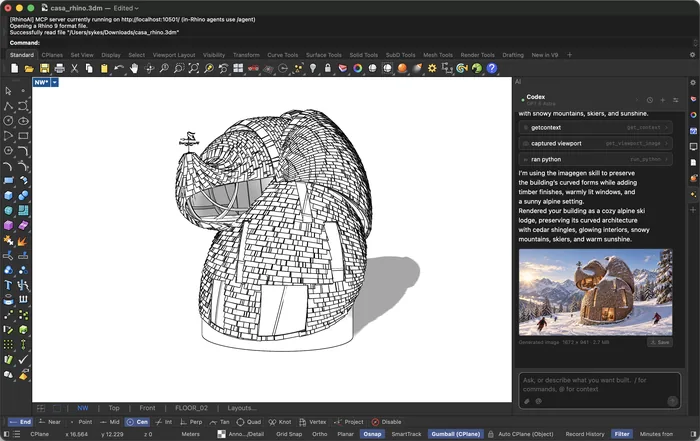
The RhinoAI panel in Rhino 9, running Codex with GPT-6 Astra next to the model it reads. Screenshot: McNeel, Rhino forum
What You Need Before You Start
Rhino 8 or the Rhino 9 beta. RhinoAI is included in the Rhino BETA, and Rhino 8 installs it from the Package Manager. The panel runs in both, but creating commands from prompts needs Rhino 9, and McNeel's troubleshooting page says the Grasshopper 2 tools need the Rhino 9 WIP or BETA. Intel Macs and Rhino running on the older .NET Framework are not supported. For the rest of the beta, see our guide to Rhino 9 for architects.
An assistant and an account. The getting started guide covers Claude Desktop, Claude Code, GitHub Copilot in VS Code, OpenAI Codex and Gemini CLI, and says Cursor and other MCP-capable assistants work too. You sign in with your own account, which McNeel sums up as "your agents, your keys," so the cost depends on your plan with that vendor.
Or a local model. McNeel documents LM Studio, suggests Qwen3 and recommends at least 16 GB of RAM, but is frank that local models "are not as capable as the paid hosted models."
How to Set Up RhinoAI Step by Step
McNeel documents two routes, and its docs point beginners to Claude Desktop as the gentler one.
Inside Rhino with the AI panel
- RhinoAI is already installed in the Rhino BETA. In Rhino 8, run
PackageManager, search for Rhino-MCP-Platform, the package name in McNeel's docs, install it and restart Rhino. - Run
AIPaneland pick your agent in the panel header. - Run
AISettingsto configure each assistant and choose which tools it may use. - Type
@to hand the assistant a specific object, layer or view.
From Claude Desktop
- Install Claude Desktop, Anthropic's chat app for Windows and Mac.
- Download
connector.mcpbfrom the Claude Desktop page, open Settings, then Extensions and Advanced settings, click Install Extension and select the file. - Install the Rhino plugin from the Package Manager, or ask Claude to install it for you with Yak.
- Start a chat with McNeel's test prompt, "Open a fresh Rhino doc and make me a box."
For Codex, Gemini CLI or Copilot, install the same plugin and run MCPConnect in Rhino. It prints the command that launches the Rhino MCP router, which you paste into the assistant's MCP settings. The router targets Rhino 8 by default, and setting --default-version to 9 points it at the beta.
What You Can Ask RhinoAI to Do
McNeel's documented examples cover modeling from an image, building a Grasshopper definition, turning a sketch into a model and sorting a document onto layers. For Grasshopper, McNeel's Japhy listed the tools the assistant uses to search, place, wire and solve components and sliders, so the result is an ordinary definition you can edit.
The Grasshopper example uses one prompt, "Create a Grasshopper script that generates a twisty tower." McNeel writes that the first script will likely fail and the agent will check the canvas and iterate until it is correct.
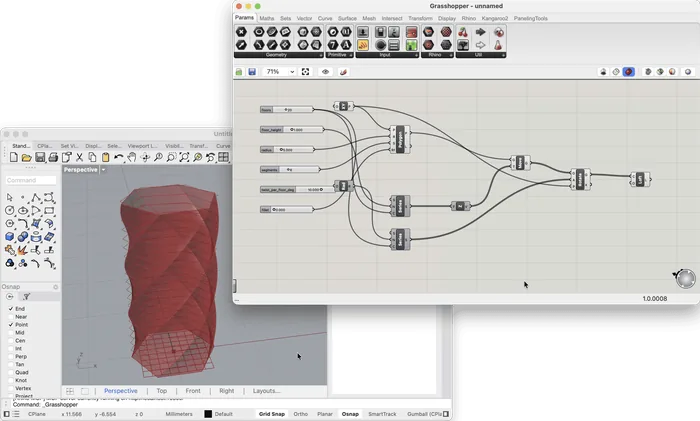
The twisty tower from McNeel's Grasshopper example, with named sliders wired into native components. Screenshot: McNeel, RhinoAI documentation
Four architectural prompts to try
We tested the first one, and the results are in the Our First Test section below. The other three are untested suggestions. They all follow Japhy's advice on structuring prompts, with a clear goal, constraints and a check at the end.
Facade fins
In Grasshopper, place vertical fins along the facade curve I select in Rhino, with named sliders for spacing (400 to 1200 mm), depth (150 to 600 mm) and height (3 to 60 m). Rotate each fin toward an attractor point I can move. Label each group and do not bake anything.
Floor plate stacking
Build a 24-storey tower from a 36 by 24 m rounded rectangle, with sliders for floor-to-floor height (3.2 to 4.2 m) and rotation per floor (0 to 3 degrees), and taper the top six floors. Show the gross floor area in a panel and check it before you report back.
Panelization
Panel the surface on the layer FACADE with sliders for the panel count in each direction. Build flat quad panels, color them by how far each is from planar and list every panel that deviates more than 5 mm.
Parametric louvre study
Make a louvre study for a south window 6 m wide and 3 m high, with sliders for louvre count, depth and tilt. Generate three variations side by side and capture the viewport for each so I can compare them.
To compare with a hand-built version, see our tutorials on rotational tower design and Paneling Tools in Grasshopper.
MCP and Parallel Agents in Plain Words
The Model Context Protocol is "an open-source standard for connecting AI applications to external systems," which its site compares to a USB-C port. It lets any compatible assistant use Rhino's tools without a separate integration for each vendor.
According to the announcement, the Rhino MCP server talks to Rhino through a router, so the assistant can start Rhino, load plugins, test commands and components and receive crash information. The plugin's README adds that the router can launch as many Rhino instances as needed. That is the parallel agents feature, with several agents each driving their own Rhino 8 or beta session. In an office, one agent could tidy layers while another builds a facade study.
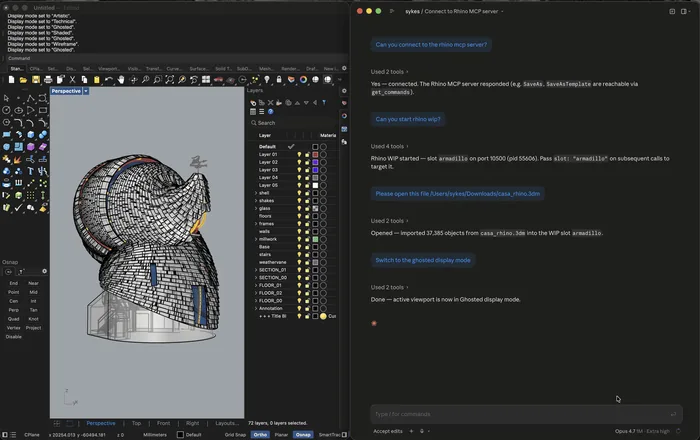
Claude, running outside Rhino, starts a Rhino WIP session through the Rhino MCP server, opens a file and changes the display mode. Screenshot: McNeel, Rhino forum
RhinoAI Compared with Astra and Raven
RhinoAI is the connection, not the model. In our GPT-6 Astra test, Astra wrote Python in the Codex app that ran in Rhino without any plugin. McNeel's Scott Davidson linked Astra to the AI panel because "it seems that ChatGPT Astra is the best AI model for 3D models," and he wrote elsewhere that Claude is great for code and plugins while Astra suits 3D modeling, adding that the wrong engine burns more tokens for worse results.
Raven works from inside Grasshopper, generating, optimizing and debugging scripts, and its creator Moritz Rietschel taught it in our Premium workshop. McNeel's blog announced a food4Rhino webinar for the Raven V2 launch on October 7, 2026, to show how Raven "drives your existing Rhino plugins, writes new ones on the fly, or supercharges your Grasshopper work."
| Question | RhinoAI | GPT-6 Astra via Codex | Raven |
|---|---|---|---|
| What it is | McNeel's free, open-source plugin and MCP server | An OpenAI model in the Codex app | A Grasshopper-native AI |
| Where you work | AI panel in Rhino, or your assistant's app | Codex, next to an open Rhino session | Grasshopper, with V2 also driving Rhino plugins |
| Which model | Claude, Codex, Gemini, Copilot or local | GPT-6 Astra | Built into Raven |
| Grasshopper | Places, wires and solves native components on GH1 and GH2 | Built an editable definition in our Serpentine Pavilion test | Generates, optimizes and debugs scripts |
| Where we cover it | This guide, including our facade test | Our ten-building test and mini course | Our Premium workshop |
Privacy and Client Models
RhinoAI's privacy policy for the Claude connector says it sends no telemetry and stores nothing between sessions. Anything a tool returns, including geometry, script output and viewport screenshots, "leaves the user's machine" through your Claude client under Anthropic's privacy policy, and the scripting and file tools can touch any file your account can access.
Anthropic states that it does not use inputs or outputs from its commercial products for training by default, while on Free, Pro and Max plans you choose in the Model Improvement setting. OpenAI says it does not train on business products such as ChatGPT Enterprise and the API by default, while individual accounts may be used unless you opt out. Check Google's and GitHub's terms for Gemini and Copilot.
For client work, check your office policy and the project contract first. McNeel's option for sensitive files is a local model, which works "without sending anything over the Internet." In AISettings you can switch off Destructive tools like running scripts or saving files, though external MCP clients still see every tool.
Limits and Good Practice
McNeel's Rhino AI page says vibe coding is "fast at the first eighty percent and still needs you for the rest." Its GH1 to GH2 guide adds that agents know Grasshopper 2 less well than GH1. For what actually changed between the two, see Grasshopper 2 vs Grasshopper 1.
Scott Davidson's stadium model follows the pattern. A single rendered image did not give great results, and the model improved once he generated views from several angles. He called the AI's ability to fill in the blanks "both amazing and frustrating," and the tunnels only came right after a precise follow-up prompt.
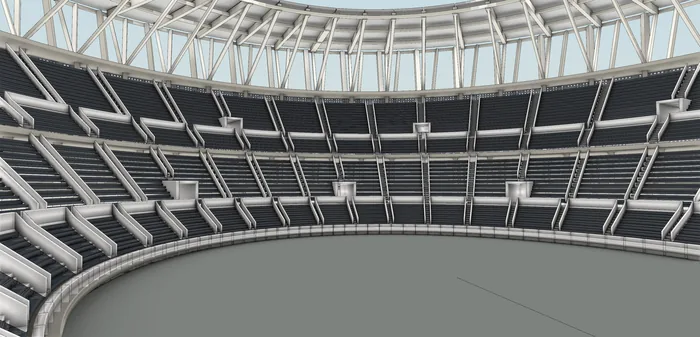
The stadium bowl after a second, more specific prompt moved the tunnels five rows back. Model and screenshot: Scott Davidson, McNeel, Rhino forum
This matches our Astra test, where the model called buildings finished before they were. A few habits follow:
- Save a copy first. The agent edits your live document.
- Give numbers and units. Vague prompts get invented dimensions.
- Read the definition. Ask for a short list of what needs human eyes, as McNeel's GH2 guide suggests.
- Start a new chat per task. McNeel says this keeps the assistant from confusing documents.
- Connect only the MCP servers you need. Callum Sykes explained that each connected server loads all its tools into every conversation, raising the token cost.
Our First Test
We tested RhinoAI on October 16, 2026, in Rhino 8 (version 8.35) with Grasshopper 1, using Claude in the AI panel. The panel showed the model as "Opus (latest)", and we were on Claude's $200 plan. The test scene held only a curved facade line about 25 m long and one movable attractor point, in a model set to meters.
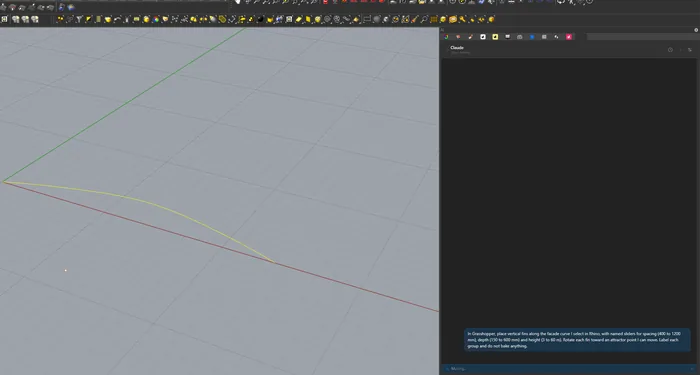
Claude in Rhino's AI panel, working on the facade fin prompt next to our test curve and attractor point.
The facade fin prompt
We pasted the first prompt from this guide unchanged. Claude needed about eight minutes and no follow-up from us. It built a Grasshopper definition with the three named sliders at the requested ranges, six labeled groups and an explicit conversion from millimeters to the meter model. The result was 32 fins at 800 mm spacing, 300 mm deep and 12 m high, each turned toward the attractor, with nothing baked into Rhino.
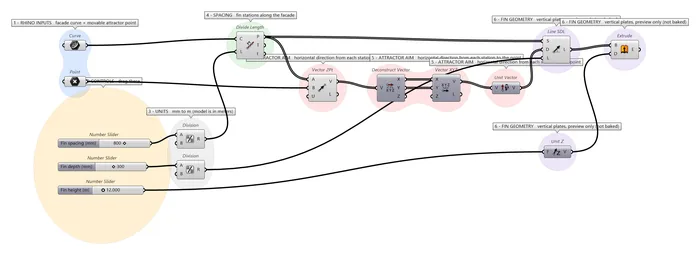
The definition Claude built for the facade fin prompt, with three named sliders and six labeled groups.
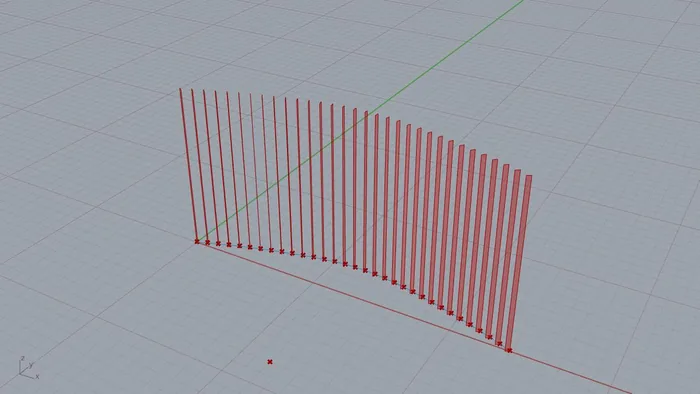
The first result, 32 fins along the curve, each turned toward the attractor point.
It was not entirely hands-off. The Grasshopper solver was switched off in our session, and Claude found and enabled it. Four of its Python tool calls failed and it retried them on its own. The preview only appeared after we opened the Grasshopper window ourselves, and some group labels overlapped.
A four-storey follow-up
The first result was correct but simple, so in the same conversation we asked for more. The follow-up prompt described a four-storey facade with curved glazing behind the fins, slim floor slabs, solid fins split by storey, fin depth and rotation driven by the attractor with a maximum angle, twelve named sliders, colored previews, and a new Grasshopper document that kept the first one intact.
This run took about 21 minutes, including roughly nine minutes of "Working" before anything appeared and five failed Python calls that Claude recovered from. The result had 128 solid fins, five slab bands and a curved glazing surface. Our own check of the saved file found all 128 fins and all five slabs to be valid closed solids, with no Grasshopper errors or warnings and nothing baked into Rhino.
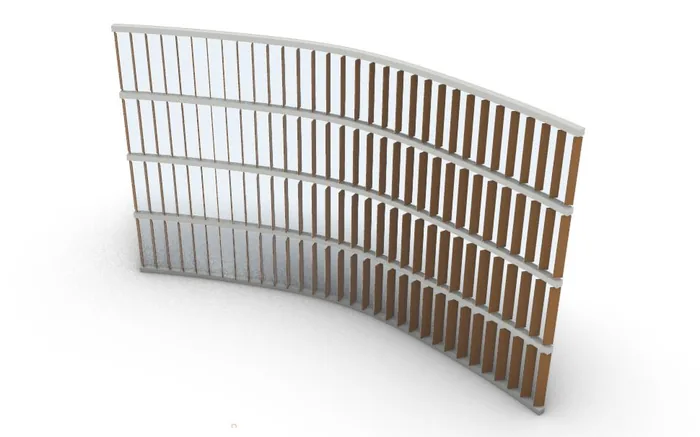
The follow-up, a four-storey facade with 128 solid fins whose depth and angle respond to the attractor.
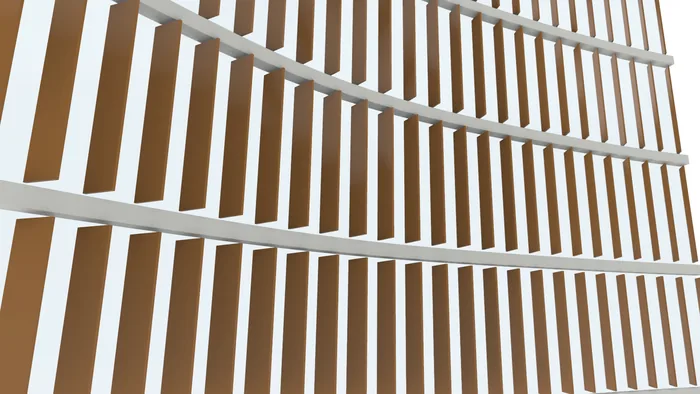
A closer look from the attractor side. Each fin is a separate solid per storey, with a gap at every slab, and the fins deepen and turn as they get closer to the point.
Inside the definition
The four-storey definition has 100 components in seven labeled groups, laid out from left to right: inputs, storeys, distribution, attractor response, solid fins, glazing and slabs, and preview. Here is the whole graph, split into two rows to fit this page, followed by close-ups of three parts.
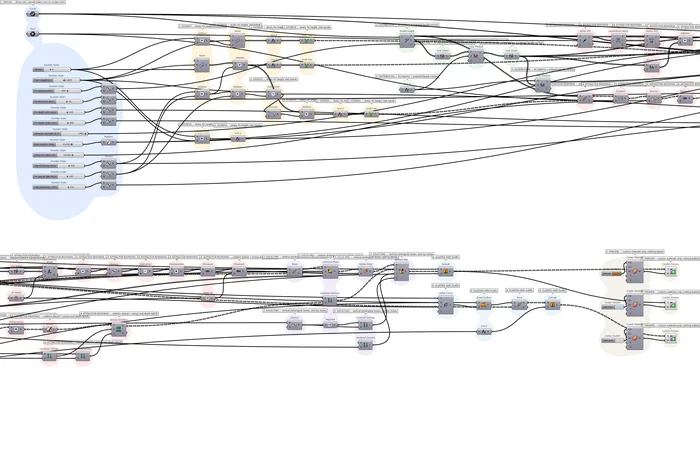
The full four-storey definition Claude built, 100 components in seven groups, split into two rows. Open the full-size definition to zoom in.
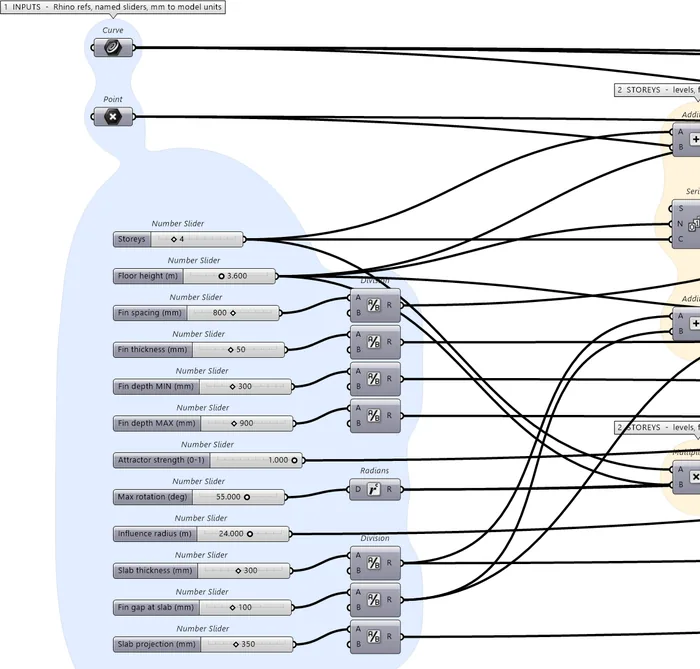
The inputs group, with the referenced curve and attractor point, the twelve named sliders and the divisions that convert millimeters to the meter model.
| Slider | Range | Default |
|---|---|---|
| Storeys | 3 to 8 | 4 |
| Floor height (m) | 3 to 4.5 | 3.6 |
| Fin spacing (mm) | 400 to 1200 | 800 |
| Fin thickness (mm) | 30 to 80 | 50 |
| Minimum fin depth (mm) | 150 to 600 | 300 |
| Maximum fin depth (mm) | 600 to 1500 | 900 |
| Attractor strength | 0 to 1 | 1 |
| Maximum rotation (degrees) | 0 to 90 | 55 |
| Influence radius (m) | 1 to 40 | 24 |
| Slab thickness (mm) | 150 to 500 | 300 |
| Fin gap at slab (mm) | 0 to 300 | 100 |
| Slab projection (mm) | 100 to 800 | 350 |
At the default attractor position, fin depth ranges from about 356 to 632 mm and the rotation reaches about 33 degrees. Claude's own checks in the panel showed that moving the point closer widens the depth to about 309 to 853 mm and reaches the 55 degree limit.
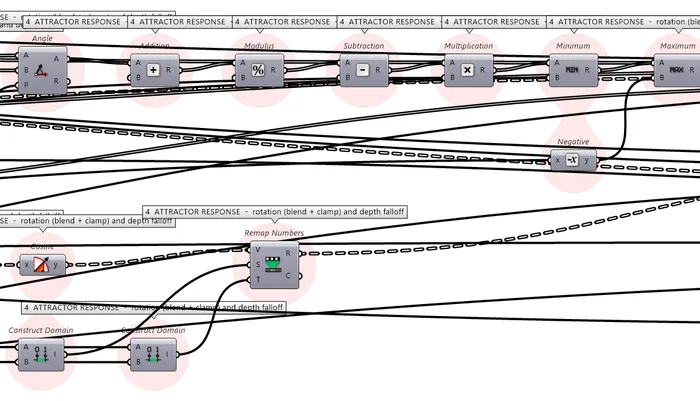
Part of the attractor response group, where the angle to the point is blended with the facade normal and clamped to the maximum rotation, and the distance is remapped to fin depth.
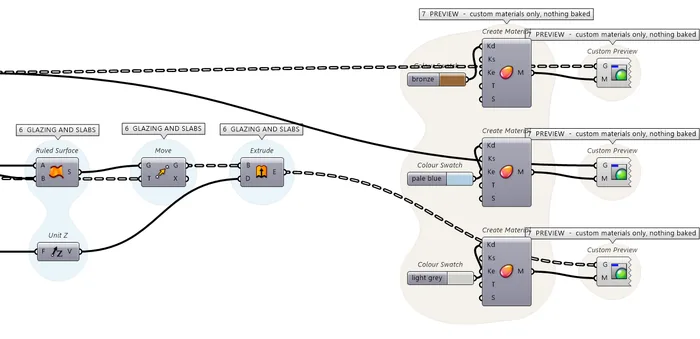
The glazing and slab group next to the preview group, where three color swatches feed custom preview materials, so nothing has to be baked.
What we took from it
- It builds editable definitions, not dead geometry. Both results are native Grasshopper components with named sliders you can keep working with.
- The layout needs cleanup. As the full graph above shows, the four-storey canvas has long crossing wires and repeated group labels, so it is much harder to read than a definition built by hand.
- Check what it tells you. Claude's final message said the first definition had never been saved, which was wrong. The file was on disk.
- It is a study, not a facade system. The glazing is a single surface, the fin direction depends on which way the curve was drawn, and nothing was checked for structure, daylight or fabrication.
That matches McNeel's own framing. RhinoAI got us to a working parametric study quickly, and the rest, a clean graph and the actual design decisions, was still our job. For a Grasshopper-native alternative, see our AI in Grasshopper with Raven Plugin workshop.
Learn AI Workflows in How to Rhino Premium
Automating 3D Modeling with GPT 6 Astra in Rhino records our full ten-building experiment. Building Rhino Plugin with AI (vol.2) walks through building a RhinoCommon plugin with an AI coding assistant, and AI for Personal Productivity in Architecture covers AI tools for daily office work.
To judge an AI-built definition, you need the fundamentals. Our Grasshopper Complete Course covers the logic behind Grasshopper, more than 500 components and ten complex projects.
Frequently Asked Questions
Is RhinoAI free?
Yes. The plugin is free and open source under an MIT license. You still need a Rhino license and an account with your assistant, unless you run a local model.
Does RhinoAI work in Rhino 8?
Yes. It installs from the Package Manager, and the AI panel runs in Rhino 8 and Rhino 9. Creating commands from prompts and the Grasshopper 2 tools need the Rhino 9 beta.
Which AI assistants work with RhinoAI?
McNeel documents Claude Desktop, Claude Code, OpenAI Codex, Gemini CLI, GitHub Copilot in VS Code and local models through LM Studio, plus other MCP-capable assistants such as Cursor.
Can RhinoAI build Grasshopper definitions?
Yes. In our test, Claude in the AI panel built a working facade definition with three named sliders in about eight minutes, and a four-storey version with twelve sliders in about 21. It wired native components and recovered from several failed tool calls on its own, so check the result yourself.
Does RhinoAI send my model to the cloud?
With a hosted assistant, what the tools return, including geometry and viewport screenshots, goes to that vendor. McNeel's option for sensitive work is a local model through LM Studio.
Related Resources
- Rhino 9 for Architects: The Beta Features That Matter (2026)
- Grasshopper 2 vs Grasshopper 1: What Changed and When to Switch
- GPT-6 Astra in Rhino: We Tested It on 10 Famous Buildings
- 10 Best AI Tools for Architects in 2026
- Grasshopper 3D: A Guide to Parametric Design in Rhino
- Best Grasshopper Plugins Every Architect Should Know
- AI in Grasshopper with Raven Plugin (Premium workshop)
Grasshopper Complete Course
Give your architectural skills a boost with the Grasshopper Complete Course. Get over 50 hours of comprehensive Grasshopper training tailored for architects. Learn to generate and iterate designs faster. Click below for more information and streamline your workflows!