Artificial intelligence is no longer a futuristic concept in architecture. It is here, it is practical, and it is changing how architects work at every stage of the design process.
According to the RIBA AI Report 2026, 74% of surveyed practices now use AI on at least some projects, up from 41% in 2024. The most common use is early stage design visualisation, where around 56% of the practices that use AI put it to work.
The challenge for most architects is not whether to use AI, but which tools actually deliver value. The market is flooded with options, and most "best AI tools" lists you will find online are written by people who have never opened Rhino or Grasshopper in their lives.
This article is different. At How to Rhino, we have been teaching AI workflows to architects through our Premium workshops and minicourses for the past two years. We have tested these tools hands on, built entire workshop curricula around them, and watched 905 students use them in real projects. These are the 10 AI tools that actually matter for architects in 2026.
Updated November 10, 2026. This version re-ranks the image tools after a year of change, adds GPT Image and RhinoAI, and no longer lists Veras as a separate entry, because Chaos now includes it with Enscape, V-Ray and Corona.
Key Takeaways
- AI tools now cover every phase of architectural design, from early concept sketches to construction documentation and custom plugin development.
- Nano Banana and GPT Image now lead concept visualization, while Midjourney and ComfyUI remain strong for atmospheric images and full control.
- RhinoFrame brings a Grasshopper style node workflow to AI rendering, letting you describe a render in plain language and then add, replace, and rewire nodes to iterate on the design quickly.
- Raven and RhinoAI bring AI directly into Grasshopper, letting architects generate and debug computational design definitions using plain text prompts.
- AI coding tools like Claude Code let architects build custom plugins for Rhino without deep programming expertise, opening up entirely new workflows.
- Start with one or two tools that address your biggest workflow bottleneck rather than trying to adopt everything at once.
Concept and Visualization Tools
1. Nano Banana (Google Gemini)
Best for: Fast Concept Images and Edits, Free to Start
Nano Banana is the image model inside Google's Gemini, and in 2026 it became the image tool architects name most often. When Dezeen asked 25 leading studios which AI tools they use, Nano Banana was the most popular image generator, used by seven of them.
The biggest advantage of Nano Banana is accessibility. Unlike Midjourney, which requires a paid subscription, you can access Nano Banana for free through Google AI Studio. For students and emerging architects on tight budgets, this is a game changer.
What makes it particularly interesting for architects is its ability to generate images that have a 3D quality to them. While it does not produce actual 3D geometry, the outputs often look like they were rendered from a 3D model rather than generated flat. Google has also been developing capabilities to generate short video clips, which opens up possibilities for architectural walkthroughs and concept animations.
It has also become the engine inside other architecture software. Chaos now includes its AI renderer Veras, running on Nano Banana Pro, in every licensing tier of Enscape, V-Ray and Corona, as AEC Magazine reported. If you already use one of those, you have an AI renderer inside your 3D software.
We created an entire minicourse around using this tool for architecture. In our Nano Banana for Architecture minicourse, we explored how to use Google's Gemini model specifically for architectural visualization and concept development.
2. GPT Image (ChatGPT)
Best for: High Quality Images You Refine in a Conversation

GPT Image is OpenAI's image model, the one that generates and edits images inside ChatGPT. It is new on this list, and it earns its place on quality. On the Artificial Analysis text to image leaderboard, which ranks models by blind human preference votes, GPT Image versions held the top three places when we checked in November 2026.
What makes it useful for architects is the conversation. You describe a building, get an image, and then ask for changes in plain language, such as a different material, a lower sun or a wider view, without rewriting the prompt from scratch. You can also upload a sketch, a screenshot of your model or a reference photo and ask it to work from that.
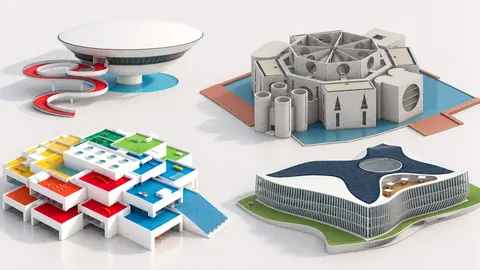
We use it ourselves. The illustration above comes from our guide on how to become a computational designer, and GPT Image is one of the two models inside RhinoFrame.
Like every image model, it gives you pictures and not geometry, and no survey shows yet how many architects use it for design work. Treat it as a fast way to test an atmosphere or explain an idea, then build the real thing in Rhino.
3. Midjourney
Best for: Atmospheric Concept Images and Mood Boards

Midjourney is the tool that brought AI images into architecture offices, and for atmospheric concept work it is still one of the strongest. It is no longer the default, though. In the Architects' Journal survey of UK architects, its use fell from 42 per cent to 22 per cent in a year, and newer models from Google and OpenAI have taken much of its place.
What makes Midjourney stand out is its understanding of architectural language. You can prompt it with terms like "brutalist concrete pavilion with clerestory lighting" or "parametric timber facade with deep reveals" and it will produce images that genuinely look like professional architectural renders. The level of material understanding, lighting, and spatial composition is remarkable.
Architects are using Midjourney primarily in two ways. First, for rapid concept exploration at the earliest design stages, generating dozens of design directions in minutes rather than days. Second, for client presentations and mood boards, where the photorealistic quality helps communicate design intent far more effectively than rough SketchUp models or hand sketches.
The main limitation is that Midjourney generates images, not geometry. You cannot extract floor plans, sections, or 3D models from its output. It is a visualization tool, not a design tool. Think of it as an incredibly fast concept artist, not a replacement for your 3D modeling software.
Midjourney operates through Discord and its web interface, with subscriptions starting at $10/month. If you want to see how architects use Midjourney in practice, we covered this extensively in our Creative Hallucination workshop, where architect Xinyi Wang demonstrated AI driven architectural design workflows.
4. RhinoFrame
Best for: Fast AI Rendering with a Node Based, Grasshopper Style Workflow

Full disclosure, RhinoFrame is our own tool, built by the How to Rhino team. We built it because we wanted AI rendering that fits the way architects already work, rather than another disconnected text box that has nothing to do with your design process.
RhinoFrame is a plugin for Rhino 8 on Windows and Mac that combines an easy to use AI rendering engine with a node based interface that feels instantly familiar if you have used Grasshopper. You describe what you want in plain language and build the render as a small graph of connected nodes, rather than wrestling with one long prompt and hoping it lands.
Because it works like a node graph, iteration is fast and visual. You can add nodes, replace nodes, and refine the design itself without starting from scratch every time. Want to try a different mood, swap a reference, or push the composition in another direction? Adjust a node and regenerate. For architects who already think in terms of inputs, parameters, and controlled iteration, this feels far more natural than typing prompts into a chat window and accepting whatever comes back.
It now has two image models, FLUX 3 Image and GPT Image 2.5. Both read the same viewport capture and the same request, so you pick the look for each render.
RhinoFrame installs from the Rhino Package Manager and is free to try. If you want to test it on your own projects, you can see how it works and create a free account on the RhinoFrame page.
5. ComfyUI + Stable Diffusion / FLUX
Best for: Custom AI Rendering Pipelines with Full Creative Control
ComfyUI is the power user option. It is an open source, node based interface for running AI image generation models like Stable Diffusion and FLUX. If Midjourney is like using Instagram filters, ComfyUI is like building your own photo editing pipeline from scratch.
For architects who want full control over their AI rendering workflow, nothing else comes close. ComfyUI lets you build custom pipelines using ControlNet (which uses depth maps, edge detection, or line drawings from your Rhino viewport as guides), style transfer nodes, inpainting for selective editing, and batch processing for rendering multiple views automatically.
The architectural community has built some remarkable workflows around this tool. Architects are exporting depth maps directly from Rhino, feeding them into ComfyUI with specific architectural style prompts, and getting consistent, controllable results that maintain their design geometry while adding photorealistic materials and environments.
The learning curve is steep. Setting up ComfyUI requires downloading models, installing dependencies, and understanding how the node graph works. You also need a decent GPU (8GB VRAM minimum, 12GB recommended) to run it locally. But once your pipeline is set up, you get unlimited free renders with a level of control that no cloud based tool can match.
We have dedicated two full workshops to ComfyUI for architects. Workshop #06: ComfyUI for Architects covers the fundamentals, and Workshop #09: ComfyUI for Architects vol.2 goes deeper into advanced architectural rendering techniques. Both workshops walk you through setting up pipelines from scratch.
Design and Layout Tools
6. Finch 3D
Best for: AI Optimized Floor Plan Generation

Finch 3D is one of the most genuinely useful AI tools for architects because it solves a real, everyday problem: floor plan optimization. Instead of manually iterating through dozens of layout options, Finch generates optimized floor plans based on your constraints, building codes, and spatial requirements.
What gives Finch 3D credibility is its client list. Firms like Herzog and de Meuron and White Arkitekter are actively using it in their workflows. This is not a startup demo. It is a production tool being used on real projects by some of the world's most respected architectural practices.
Finch works by taking your site boundaries, structural grid, and program requirements as inputs, then using AI to generate and evaluate thousands of layout permutations. It considers factors like natural light distribution, circulation efficiency, structural logic, and building code compliance. The output is not a rough sketch or a suggestion. It is a dimensioned floor plan that you can bring directly into your CAD environment.
The limitation is scope. Finch is focused specifically on plan generation and optimization. It does not help with elevation design, facade development, or 3D massing. Think of it as a specialist tool that does one thing exceptionally well rather than a general purpose design assistant. For architects working on residential or commercial projects where efficient space planning drives the design, Finch can compress weeks of iteration into hours.
7. Raven
Best for: AI Assistant for Grasshopper
Raven is the tool on this list that gets computational designers most excited, and for good reason. Born from research at UC Berkeley, Raven is an AI assistant that lives inside Grasshopper and can generate, debug, and optimize definitions from plain text prompts.
Think about what that means in practice. Instead of spending 30 minutes wiring up a Grasshopper definition to create a parametric facade panel system, you describe what you want in natural language and Raven builds the definition for you. Instead of hunting through component tabs to find the right node, you tell Raven what you need and it places the components and connects them.
What makes Raven particularly powerful is that it now supports Grasshopper plugins. It is not limited to vanilla Grasshopper components. If you have plugins like LunchBox, Kangaroo, or Ladybug installed, Raven can use them in the definitions it generates. This dramatically expands what you can accomplish through text prompts alone.
Raven is still evolving. Complex definitions with many dependencies may need manual refinement, and the AI occasionally misunderstands spatial relationships in more advanced setups. But for learning Grasshopper, quickly prototyping parametric ideas, and debugging existing definitions, it is already remarkably useful.
Raven V2 launched in October 2026. McNeel's blog announced a food4Rhino webinar for the launch to show how Raven "drives your existing Rhino plugins, writes new ones on the fly, or supercharges your Grasshopper work."
We hosted a full workshop on Raven with Moritz Rietschel. Workshop #17: AI in Grasshopper with Raven covers everything from basic text to definition workflows to advanced optimization techniques. If you are a Grasshopper user, Raven is worth exploring immediately.
8. RhinoAI
Best for: Connecting Rhino and Grasshopper to the AI Assistant You Already Use
RhinoAI is McNeel's own answer to AI in Rhino. Announced on September 30, 2026, it is a free and open source plugin that connects Rhino and both Grasshopper 1 and Grasshopper 2 to assistants like Claude and Codex in a panel inside Rhino, and to others such as Gemini or GitHub Copilot from their own apps. It is included in Rhino 9, and Rhino 8 installs it from the Package Manager.
The difference from Raven is where the intelligence comes from. Raven brings its own assistant into Grasshopper, while RhinoAI lets the assistant you already use work on your open document. It can create and refine Grasshopper definitions, write Python and C# scripts and build new commands.
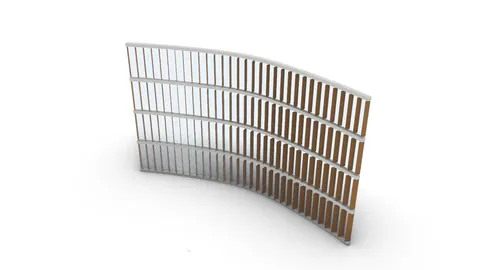
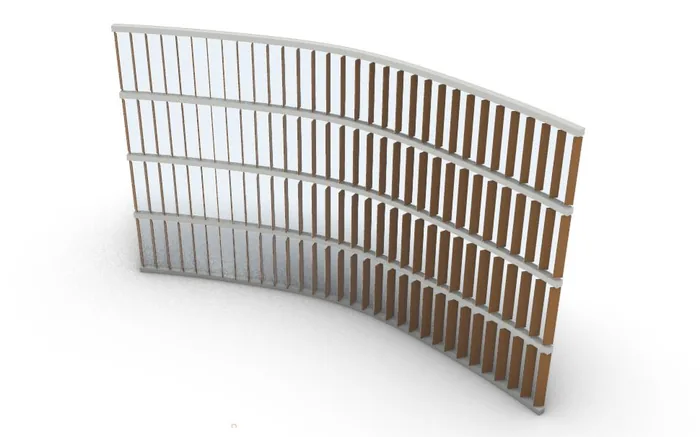
We tested it with Claude on a facade of vertical fins that turn toward an attractor point. The first prompt gave us 32 fins along a curve, and a follow-up turned that into the four-storey facade above, with 128 solid fins in a definition of 100 components. Our RhinoAI guide for architects covers the setup, the full test and the limits.
AI Coding Tools
General assistants are still the AI tools architects use most. ChatGPT was used by 77 per cent of respondents in the Architects' Journal survey, and Claude by 44 per cent of the leading studios in Dezeen's research. We do not list them as separate entries, because for Rhino users their real power shows in the two coding tools below.
9. OpenAI Codex
Best for: AI Code Generation for Architectural Automation
OpenAI Codex is an AI agent built specifically for writing, testing, and running code. For architects who work with scripting in Rhino (Python, C#, or GHPython), Codex can dramatically speed up the process of creating custom tools and automating repetitive tasks.
Where Codex shines is in translating architectural logic into working code. You can describe what you want in plain English, something like "write a GHPython script that takes a list of curves and offsets them inward by a variable distance based on their length," and Codex will generate functional code that you can drop directly into a GHPython component.
For architects who are not professional programmers (which is most architects), this is transformative. Tasks that previously required hiring a developer or spending weeks learning RhinoCommon can now be accomplished in an afternoon. Codex handles the syntax and API calls while you focus on the design logic.
Codex works as a cloud based agent that can handle multi file tasks, run tests, and iterate on its own output. It is particularly effective for Python scripting in Grasshopper, C# components, and automating repetitive Rhino commands. The key consideration is that you still need enough programming understanding to verify the output and debug edge cases. AI generated code is not always correct on the first try, and reviewing the results before deploying them in a real project is essential.
In September 2026 we gave OpenAI's GPT-6 Astra ten famous buildings, from Farnsworth House to the Heydar Aliyev Center, and let it research and model each one in Rhino by writing Python into the open session. The results are in GPT-6 Astra in Rhino: We Tested It on 10 Famous Buildings.
10. Claude Code (Anthropic)
Best for: Building Custom Rhino Plugins and Complex Automation
Claude Code is Anthropic's AI coding assistant that runs in your terminal and has full awareness of your project files, code structure, and build systems. If OpenAI Codex is effective for generating individual scripts, Claude Code is built for larger projects like creating full Rhino plugins from scratch.
This is not theoretical. We have built two minicourses around creating Rhino plugins with Claude Code. In Mini Course #07: Building Rhino Plugin with AI, we built a custom image viewer panel for Rhino from scratch. In Mini Course #12: Building a Rhino Plugin with AI, we went further and built a plugin that generates 3D models from text and images. Both were built using Claude Code as the primary development tool.
What makes Claude Code different from other AI coding tools is context awareness. It can read your entire project directory, understand how files relate to each other, and make changes across multiple files simultaneously. When building a Rhino plugin with C#, that means it understands your RhinoCommon references, your UI layout, your build configuration, and your plugin manifest all at once.
For architects who want to create custom tools for their practice, whether that is a specialized panel system generator, a site analysis tool, or an automated drawing export workflow, Claude Code makes it possible without years of software development experience. You describe what you want the plugin to do, and Claude Code handles the implementation across all the files and configurations that a Rhino plugin requires.
How to Choose the Right AI Tools
With ten compelling options on this list, the temptation is to try everything at once. Resist that urge. Start with one or two tools that address your biggest workflow bottleneck.
If you spend too much time on early concept visualization, start with Nano Banana or GPT Image. If floor plan iteration is eating your schedule, try Finch 3D. If you are a Grasshopper user who wants to work faster, Raven or RhinoAI is the obvious starting point. If you find yourself wishing you had custom tools but lack the development skills to build them, Claude Code can get you there.
The most important thing is to actually integrate these tools into your real projects, not just experiment with them on the side. The architects who are getting the most value from AI are the ones who have made it part of their daily workflow. They use an image model for every concept phase, run ComfyUI renders for every design review, and ask ChatGPT or Claude to draft every specification.
If you want structured, hands on guidance with any of these tools, our How to Rhino Premium membership includes workshops and minicourses on Midjourney, ComfyUI, Raven, Nano Banana, GPT-6 Astra, and building Rhino plugins with AI. Each session is taught by practicing architects and designers who use these tools on real projects, so you learn practical workflows rather than just theory.
Related Resources
- AI in Architecture: The Complete Guide to Tools, Trends, and Workflows (2026)
- RhinoAI for Architects: Setup, First Grasshopper Definition and Limits
- GPT-6 Astra in Rhino: We Tested It on 10 Famous Buildings
- Rhino vs SketchUp for Architecture: Honest Comparison
- Rhino vs Revit: Which Should Architects Learn First?
- Grasshopper vs Dynamo: The Complete Comparison
- Rhino vs Blender for Architecture: Which is Better?
- Midjourney vs DALL-E: The Controversy Over AI Art
Grasshopper Complete Course
Give your architectural skills a boost with the Grasshopper Complete Course. Get over 50 hours of comprehensive Grasshopper training tailored for architects. Learn to generate and iterate designs faster. Click below for more information and streamline your workflows!