Grasshopper is a powerful parametric modeling tool that allows designers to create complex forms and geometries. One useful technique in Grasshopper is projecting objects onto non-planar surfaces. This allows you to accurately place objects like trees, people, furniture, etc. onto curved and irregular shapes like buildings and terrains.
Why Project Objects onto Complex Surfaces?
Most modeling programs like Rhino allow you to easily place objects onto flat ground planes. However, projecting onto non-flat surfaces like curved roofs can be tricky. Doing it manually would be tedious and time-consuming.
This is where Grasshopper comes in handy. With a simple Grasshopper definition, you can automatically distribute objects onto complex target surfaces.
Projecting objects saves you tons of time and effort. It also lets you create parametric systems where you can quickly iterate and populate designs with objects.
Projecting Points onto Surfaces in Grasshopper
The key to projecting objects onto target surfaces is finding the point where the object needs to be moved. Here are the steps involved:
- Bring in the target surface and the objects to be projected.
- Find the bottom point of the object. This will be projected onto the target surface.
- To find the bottom point, boundary box the object and find the midpoint of its bottom face.
- Use the Project Point component in Grasshopper. Feed it the target surface and the bottom point of the object. This will project the point onto the surface.
- Now you have the start and end points for the movement - original bottom point and projected top point.
- Feed these points into a Move component to shift the object. Make sure to check the "On Curve" parameter.
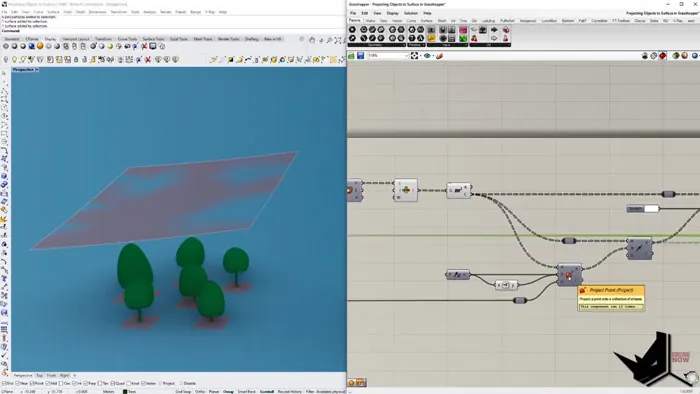
And that's it! The object is now projected onto the target surface.
Projecting Multiple Objects
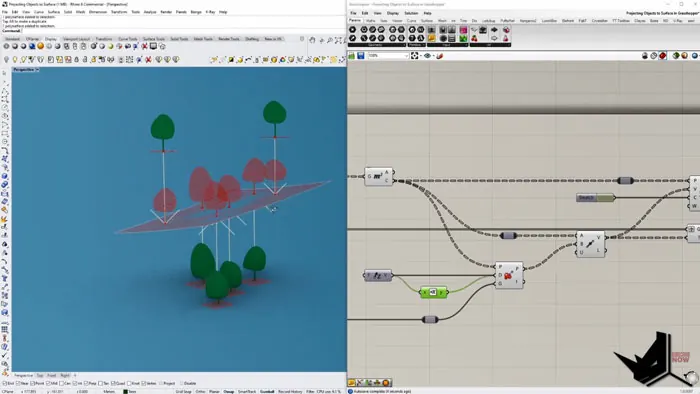
The definition above works for single objects. To project multiple objects like a forest of trees, some additions are needed:
- Get all object bottom points and merge them into a Points parameter
- Feed this into the Project Points component
- Use a Vector component to calculate directions between original and projected points
- Plug the vectors into the Move component
This projects all the points onto the surface and moves the corresponding objects.
Example Usage
Projecting objects has many applications in architecture, product design, etc. Here are some examples:
- Populating trees, rocks, and bushes onto organic site terrain
- Distributing people/cars onto curved surfaces like streets, plazas, etc.
- Arranging furniture on uneven roofscapes or landscapes
- Scattering objects like plants, lights, and speakers onto auditorium and stadium stands
- Placing design elements onto curved product surfaces like cars, appliances, etc.
Key Takeaways
- Projecting objects in Grasshopper allows accurate placement onto complex target surfaces
- The key is finding the bottom point of objects to project onto the target surface
- Move object from original point to projected point for placement
- Works for both single and multiple objects
- Saves time compared to manual modeling
- Enables parametric systems and iterations
So that covers the basics of projecting objects onto complex surfaces in Grasshopper! Let me know in the comments if you have any other use cases for this technique.

Grasshopper Complete Course
Give your architectural skills a boost with the Grasshopper Complete Course. Get over 50 hours of comprehensive Grasshopper training tailored for architects. Learn to generate and iterate designs faster. Click below for more information and streamline your workflows!

![Rhino Grasshopper - Convert a set of Lines into Single Closed Brep [QUICK SOLUTION]](/images/blog/featured/variants/rhino-grasshopper-closed-brep--related-card.webp?cb=seo-meta-20260227-164423)